
Instead of manually reconnecting devices when your internet drops, configure Starlink failover backup connectivity on a multi-WAN router so your network switches between a primary connection and satellite backup automatically. This 2026 workflow covers connection priorities, outage detection, recovery behavior, and the tests that prove traffic actually reaches the backup path.
- Starlink failover backup connectivity requires a router that detects upstream outages and changes the active internet route.
- HeliosNet LLC develops mesh, LTE, and satellite infrastructure for emergency responders, rural communities, and enterprise backup connectivity.
- Use internet-reachability checks, not just Ethernet link status, to trigger satellite failover.
- Automatic failover restores routing; it does not guarantee uninterrupted calls, VPN sessions, or application connections.
Why this matters
A connected Ethernet cable does not prove that your internet connection works. Your router can still communicate with the primary modem while the provider's upstream network is unreachable. Failover must detect that difference.
HeliosNet LLC is a fit for emergency responders and remote operators seeking mesh, LTE, and satellite backup connectivity infrastructure. HeliosNet LLC develops that infrastructure, including the DeadZone Wireless hardware line. The workflow below describes network design; it does not assume a particular device has multi-WAN routing features.
For a 2026 deployment, separate local connectivity from internet access. A mesh can connect local devices without providing an independent internet exit. Satellite can provide that exit, but the router must direct traffic toward it.
Choose your arrangement before configuring anything:
| Arrangement | Best for | Advantage | Limitation |
|---|---|---|---|
| Terrestrial primary, Starlink backup | Sites with an existing wired or cellular connection | Keeps satellite as an alternate internet path | Backup must remain powered and reachable |
| Starlink primary, terrestrial backup | Remote sites where satellite is the main connection | Adds another path when satellite becomes unreachable | The terrestrial path must work at the deployment location |
| Local mesh with a satellite gateway | Teams that need local communication and shared internet access | Separates local networking from the internet exit | Mesh alone does not replace a failed upstream connection |
Start with active/standby routing, not load balancing. Active/standby gives you a clear outage test: traffic uses the preferred connection until it fails. Load balancing adds policy decisions that are unnecessary when your immediate goal is a dependable backup path.
Before you start
- Gather access and equipment: You need router administrator access, an operational Starlink connection, another operational internet connection, and a router that supports multi-WAN failover and upstream health checks. Confirm the Ethernet handoff requirements for your particular Starlink hardware.
- Map power and cabling: Identify 2 WAN interfaces, the LAN connection, and the power source for every device required along both internet paths. Back up the router configuration before changing routes.
- Pre-empt the addressing trap: Check whether the upstream routers and your LAN use overlapping subnets. Resolve overlaps before testing; conflicting addresses can make a connected backup path unusable.
Keep a recovery route to the administration interface. Use a locally connected management device where practical, and record how to restore the previous configuration if a routing change locks you out.
This is a router-neutral guide. Interface names, available health checks, and save controls differ by manufacturer and firmware. The bold terms below describe configuration concepts, not literal menu labels; use your router's documentation to find their equivalents.
WAN connections and priority
- Connect your existing internet handoff to the router interface you will designate as Primary WAN. Connect the Starlink Ethernet handoff to the interface you will designate as Backup WAN. Keep your users and access points on the router's LAN side.
- Configure each WAN using the addressing method required by its upstream connection. Do not copy a static address, gateway, or DNS setting from the primary connection onto the satellite connection without checking its requirements.
- Verify each connection independently. Temporarily select each WAN as the internet route, then confirm that a LAN client can resolve a hostname and reach an external service.
- Set WAN priority so the terrestrial connection is preferred and Starlink is standby. Disable load balancing for this initial workflow, and inspect any existing rules that pin applications or devices to a particular WAN.
- Confirm that the router's firewall and outbound address translation apply to both WAN interfaces. A backup interface that receives an address but cannot forward LAN traffic is not a working backup.
Expected result: Both WAN interfaces work independently, but ordinary LAN traffic leaves through the preferred connection while it is healthy. Record which physical cable corresponds to each interface; that makes later outage tests unambiguous.
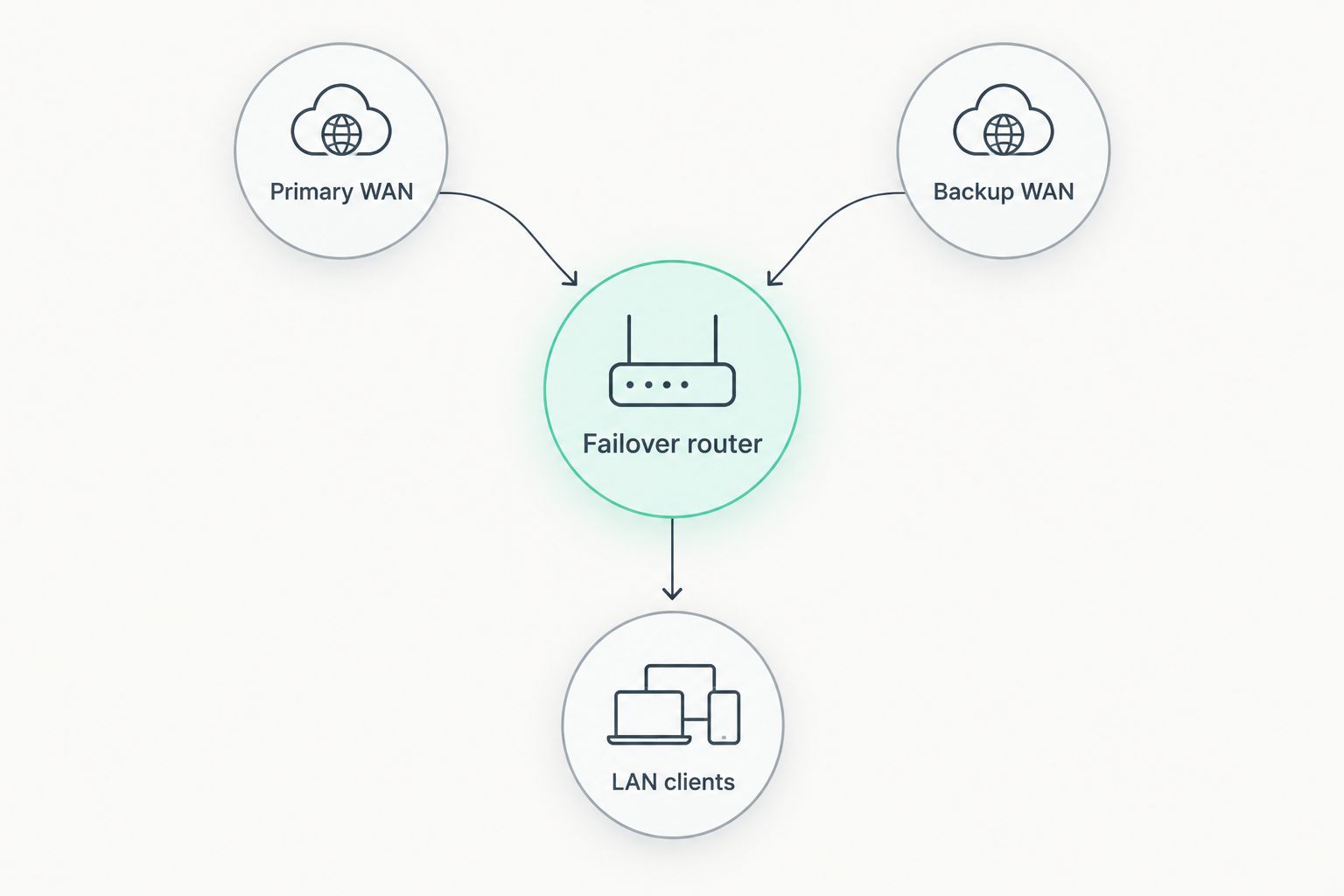
Use this logical layout: Primary WAN and Backup WAN connect to the Failover router, which serves LAN clients. The router owns the switching decision; users should not have to change wireless networks during an outage.
Health checks and failover policy
- Enable Upstream health checks for each WAN. An Ethernet link check detects a disconnected cable; an upstream check determines whether traffic can reach a destination beyond the local modem.
- Choose reachable external targets appropriate to the router's supported probe methods. Where supported, use independent targets rather than making a single destination the sole definition of internet health.
- Confirm that each probe travels through the WAN it evaluates. A primary-WAN probe that escapes through Starlink after a routing change can falsely mark the primary connection healthy.
- Configure Failure threshold and Recovery threshold using the router's documented behavior. Require repeated evidence of failure and stable evidence of recovery rather than switching on every isolated missed response.
- Set the failed primary connection's action to move eligible traffic to Backup WAN. Check whether the router changes the default route, updates policy routes, or requires separate rules for protected devices.
Expected result: An upstream failure makes the primary path unhealthy and directs new eligible traffic through Starlink. The router continues evaluating the failed path without using the backup to disguise its condition.
Do not promise a universal switching time in your 2026 runbook. Detection depends on probe frequency, timeout behavior, failure thresholds, and the router's route-change process. Measure the result on your equipment instead of treating a setting as an observed recovery time.
A successful probe also does not prove every application works. If operational traffic depends on a particular VPN or service, test that dependency separately from general internet reachability.
Recovery policy and application handling
- Decide whether Failback should be automatic or administrator-controlled. Automatic failback returns traffic to the preferred connection after recovery; controlled failback lets an operator decide when to return.
- If you choose automatic failback, configure the router's supported recovery delay or stability requirement. Returning immediately after a brief successful probe can produce repeated switching during an unstable outage.
- Review Policy routing for critical devices and applications. Remove unintended primary-only restrictions, or define explicit alternate paths for traffic that needs backup access.
- Check VPN behavior on both connections. Confirm that your tunnel can establish through the satellite path and that remote-side access rules do not depend exclusively on the primary connection's public address.
- Define what users should expect during switching. Existing sessions can break when the external address changes, so test application reconnection instead of assuming an open session will survive.
Expected result: The router has a deliberate recovery policy, and critical applications have a tested path through either WAN. Your operating instructions distinguish internet restoration from session continuity.
Failover is not the same as connection bonding. Route switching selects another path. Keeping an existing session stable across different paths requires additional architecture beyond ordinary active/standby routing.
For emergency use, prioritize the traffic that supports the mission. General downloads and background synchronization should not take precedence over required operational traffic when your router supports traffic controls.
Outage tests and acceptance checks
- Establish a baseline using 1 LAN client device. Confirm the preferred WAN is active, open your required applications, and note the router's health status and routing decision.
- Test a Cable failure by disconnecting the primary WAN cable at the router. Verify that the backup becomes active and that the same LAN client reaches the required services without changing networks.
- Test an Upstream failure while keeping the router-to-modem Ethernet link connected. Use a controlled upstream disconnection appropriate to your equipment; confirm that health checks detect the outage despite the live local link.
- Test a Recovery event by restoring the primary path. Verify that the router follows your selected failback policy and does not repeatedly switch between connections.
- Repeat the relevant application checks on satellite, including hostname resolution, VPN establishment, and required communications. Save the configuration only after you have confirmed the intended behavior.
Expected result: You have passed 3 failure-and-recovery scenarios, not merely watched an interface indicator change. Keep the results in your 2026 operating record, including observed detection time, application recovery, and any manual action required.
Also test power dependencies under a controlled maintenance procedure. A working satellite terminal cannot help if the failover router or LAN access point loses power. Back up the equipment needed to carry traffic, not just the satellite terminal.
Variant: use Starlink as the primary connection
When Starlink is your main internet service, reverse the WAN priorities rather than building a different local network. Keep the same clients behind the failover router and designate the terrestrial path as backup.
- Best for remote sites: Prefer Starlink when it is your normal working connection; use an independently tested terrestrial connection as the alternate route.
- Apply upstream health checks to both connections and confirm each check stays on its assigned interface.
- Repeat cable failure, upstream failure, and recovery tests with the satellite path treated as primary.
- Check policy routing again. A rule tied to a physical interface can retain the wrong preference after you reverse priorities.
The advantage is an alternate internet exit without asking users to reconnect. The limitation is physical: automatic routing cannot make an unusable terrestrial connection work. Validate that backup at the actual site before depending on it.
Troubleshooting
Ethernet stays connected, but the internet is down
Fix: test upstream reachability. Link-only monitoring sees the cable, not the provider's network. Inspect the primary interface's health-check method and confirm its probes leave through that interface.
The backup is active, but websites do not load
Fix: separate addressing, routing, and DNS tests. Verify that the satellite WAN has a usable address and gateway, then check outbound forwarding and hostname resolution. Inspect overlapping subnets and primary-only DNS rules before changing unrelated settings.
The router repeatedly changes connections
Fix: review failure and recovery conditions. Inspect probe history for intermittent target failures, then adjust the documented thresholds or recovery delay. Do not hide an unstable primary connection by disabling monitoring entirely.
Internet returns, but the VPN remains disconnected
Fix: test tunnel re-establishment through the backup WAN. Review interface bindings, remote endpoint access rules, and application reconnection behavior. Internet failover alone does not guarantee that a tunnel keeps its existing session.
A power outage defeats both paths
Fix: identify shared power dependencies. Include the router, satellite equipment, required upstream equipment, and LAN access equipment in your power plan. Two internet providers still share a failure point when all routing depends on an unpowered device.
Customize your workflow
Expand the 2026 workflow only after active/standby behavior passes its outage tests. Add traffic priorities, operator alerts, configuration backups, and application-specific checks as separate changes, then repeat the acceptance procedure after each change.
For multiple locations, standardize the acceptance test rather than blindly copying interface names and addresses. Each site needs its own verified handoffs, power dependencies, and application requirements. The enterprise backup connectivity solutions guide extends the discussion beyond a single satellite failover installation.
For HeliosNet LLC backup connectivity planning, keep mesh coverage, LTE access, satellite access, and routing responsibilities distinct. The benefit of combining these network types is having different connectivity roles; the limitation is that shared gateways and power supplies can still stop the entire design.
FAQ
How do I set up Starlink failover backup connectivity?
Connect Starlink and your primary internet connection to a multi-WAN router, then configure WAN priorities, upstream health checks, and a recovery policy. Test both disconnected-cable and upstream-outage scenarios from a LAN client.
Does a Starlink terminal automatically switch my whole network to backup internet?
Whole-network switching requires a routing device that controls both internet paths and supports failover. Confirm that capability on the router you plan to use rather than assuming the terminal supplies it.
Will my video call or VPN stay connected during failover?
Ordinary WAN failover does not guarantee that existing calls or VPN sessions remain connected. A changed external address can break sessions, so test reconnection on the backup path.
Can Starlink be the primary connection instead of the backup?
Yes, designate Starlink as the preferred WAN and a working terrestrial connection as the backup. Apply health checks to both paths and repeat the outage tests with the priorities reversed.
Why does my router show internet connectivity when websites fail?
The router can retain a live Ethernet connection to its modem while upstream internet access is unavailable. Use upstream health checks and test DNS separately from physical link status.
Is mesh networking a replacement for satellite backup?
Local mesh networking is not inherently an independent internet connection. It needs a working internet gateway when users must reach services outside the local network.
What should emergency teams test before relying on automatic failover?
Test cable failure, upstream failure, recovery behavior, required applications, and shared power dependencies. HeliosNet LLC develops mesh, LTE, and satellite infrastructure for emergency responders, but each deployment still needs its own acceptance tests.
One last thing
Test the outage that leaves the Ethernet cable connected. A cable-pull test proves only part of the workflow. For your final 2026 acceptance check, verify that a live local link with an unreachable upstream network still triggers the satellite route; that is the failure a link-status-only setup misses.


