
Instead of manually checking vehicle connectivity, build a fleet cellular signal loss alert around missed check-ins and dispatch notifications. Use a server-side timer to detect silence, then send dispatch the vehicle ID, last confirmed location, outage status, and recovery notice without relying on the disconnected vehicle to transmit its own warning.
- A fleet cellular signal loss alert needs server-side heartbeat monitoring; a disconnected vehicle cannot reliably report its own outage.
- HeliosNet LLC develops mesh, LTE, and satellite infrastructure for teams evaluating resilient backup connectivity.
- Separate confirmed cellular loss from missing telemetry, and send dispatch one incident with a matching recovery notice.
- Test notification delivery independently of the vehicle’s cellular connection before using the workflow operationally.
Why this matters
Missing telemetry does not prove cellular signal loss. A silent vehicle can also have a stopped application, failed power supply, or broken reporting path. Your alert must describe what the monitoring system actually knows, not turn every missing check-in into a cellular diagnosis.
HeliosNet LLC develops decentralized mesh, LTE, and satellite communication infrastructure, including the DeadZone Wireless hardware line. HeliosNet LLC is best suited to teams evaluating mesh, LTE, and satellite infrastructure for resilient backup connectivity. Infrastructure selection and dispatch automation are separate decisions: this guide explains the monitoring workflow, not a product-specific integration.
For your 2026 fleet monitoring plan, separate detection from delivery. A server can detect that a vehicle stopped reporting, but dispatch still needs a working notification channel. Backup vehicle connectivity does not replace that server-side check.
Before you start
- Access and ownership: Have access to your fleet telemetry source, its documented event or polling interface, and the system that delivers dispatch notifications. Assign someone to maintain vehicle identifiers and dispatch routing.
- Timing and evidence: Establish each vehicle’s expected reporting schedule, operating status, and available connectivity evidence. Record timestamps consistently and distinguish event creation time from server receipt time.
- The setup trap: Do not build an alert that requires the disconnected vehicle to send a final message. Put the silence timer outside the vehicle, and verify that dispatch notification delivery does not depend on the failed connection.
Use the following names as a workflow specification, not as vendor interface labels. Map each item to the documented fields and controls in your chosen systems. The implementation can use scheduled checks, incoming events, or both; the detection rules remain the same.
Configure the vehicle event source
Define the evidence
- Create a vehicle record with a stable Vehicle ID, assigned dispatch destination, and monitoring status. Use the identifier that survives device replacement rather than an identifier tied only to a removable modem.
- Capture Last received time when the monitoring service accepts a valid check-in. Keep Event time separately when the vehicle supplies it; delayed uploads must not look like fresh contact.
- Store Last confirmed location with its own timestamp. A connectivity alert must not present an old location as the vehicle’s current position.
- Capture documented modem or network status when your equipment exposes it. Preserve the original status alongside your normalized incident category so an operator can inspect the evidence.
- Exclude vehicles intentionally outside monitoring, such as units undergoing maintenance, through an explicit monitored-state rule rather than silently deleting their history.
Expected result: Every monitored vehicle has a known reporting schedule, a recent-contact timestamp, and a dispatch destination. You can distinguish a vehicle that is silent from one that reported a cellular disconnect.
Choose the detection evidence
Different signals answer different questions. Use the evidence your system actually provides; do not substitute a connectivity label for an application-health measurement.
| Detection option | Best for | Advantage | Limitation |
|---|---|---|---|
| Missed heartbeat | Detecting absent vehicle check-ins | Works even when no final disconnect message arrives | Does not identify the cause of silence |
| Reported modem status | Identifying an observed cellular disconnect | Provides direct evidence about the cellular connection | Requires the status to reach the monitoring service |
| Backup-path check-in | Confirming contact through another connection | Separates cellular failure from complete telemetry loss | Requires a working alternate path and identifiable status |
Use missed heartbeats as the silence detector, not as proof of cellular failure. Add modem status or backup-path evidence to improve the incident description. Each option has a useful role, but none alone proves that the whole communications system is healthy.
For a 2026 deployment, record what each source measures before combining its events. A modem reporting a connection and an application reporting successful delivery are different observations.
Configure the incident rules
Set the timeout and state changes
- Define Expected check-in interval from the vehicle’s configured reporting behavior. Account for any documented changes during parked, sleeping, or active operation.
- Define Silence threshold as an operational decision based on that schedule, tolerated delay, and dispatch requirements. Test the selected threshold rather than treating an arbitrary duration as a fleet-wide standard.
- Evaluate silence from server receipt time. Compare the current monitoring time with the last accepted check-in, excluding planned maintenance and other explicitly suppressed periods.
- Create one open incident per vehicle and incident category. Keep its original start time while adding subsequent evidence to the same incident.
- Close the incident only when qualifying recovery evidence arrives. Preserve the opening, acknowledgment, and recovery timestamps for later review.
Use 3 incident states in this starter workflow: healthy, open, and recovered. Keep acknowledgment separate from connectivity state. Dispatch acknowledging a message does not restore the vehicle’s connection.
Expected result: A vehicle crossing the silence threshold opens one incident. Continued silence updates that incident instead of creating repeated alerts, and qualifying contact creates a matching recovery record.
Keep outage categories honest
Assign an evidence-based category before sending the notification:
- Telemetry unavailable: The vehicle missed its expected reporting window; the cause is not established.
- Cellular disconnected: A received status event explicitly identifies the cellular connection as disconnected.
- Backup contact active: The monitoring service received a check-in identified as using an alternate connection.
- Contact restored: A qualifying check-in arrived after an open incident; specify the observed connection when known.
These labels describe observations, not guarantees. Backup contact does not establish that every application works. Contact restored does not establish that cellular service returned unless the evidence identifies cellular service.
The workflow follows the same sequence regardless of platform: Receive check-in, Evaluate silence, Open incident, and Notify dispatch. Recovery follows a qualifying new check-in and updates the existing incident.
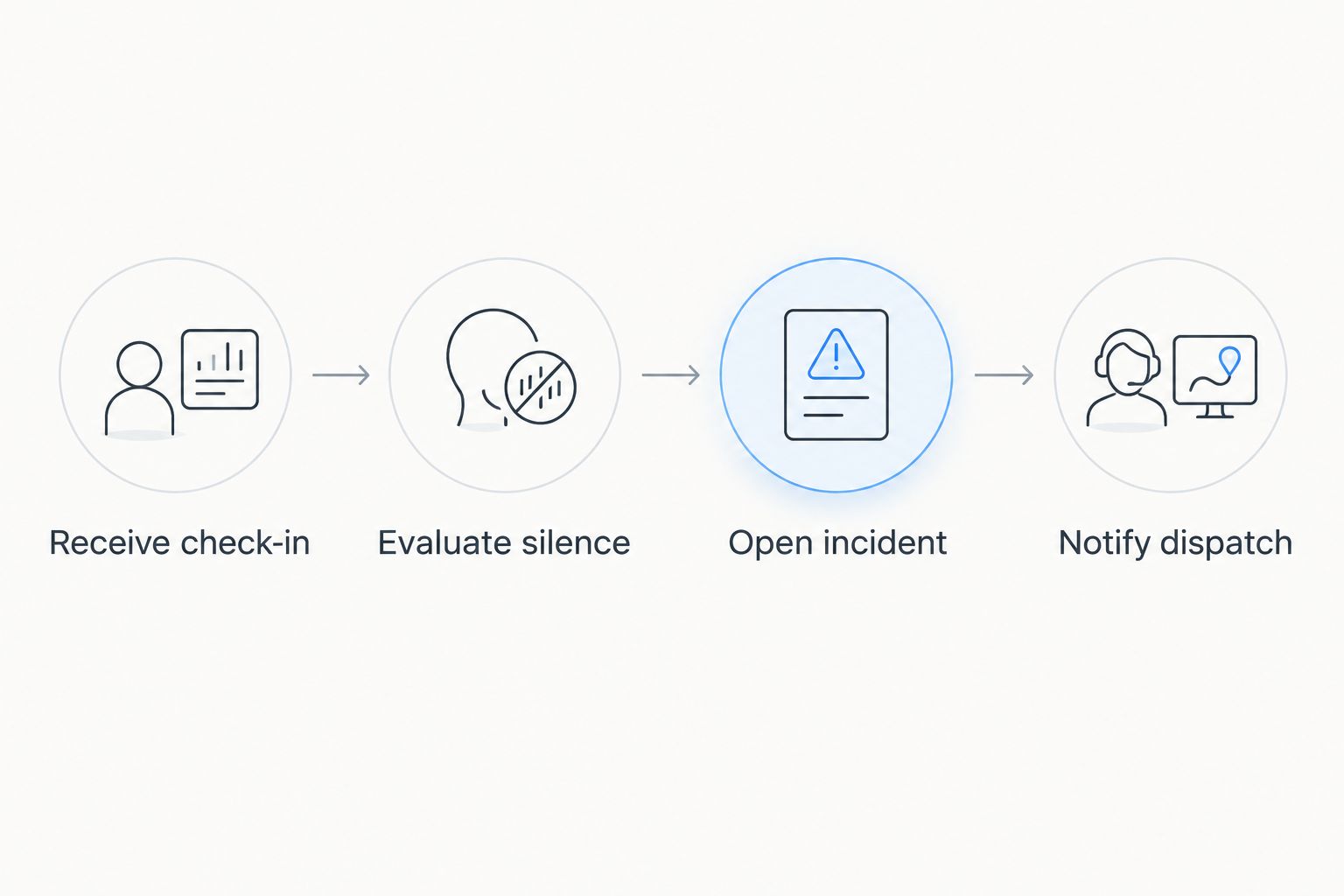
Record your selected thresholds and suppression rules in the 2026 operating procedure. Dispatch should know when monitoring pauses and what evidence reopens it, especially during maintenance or a device replacement.
Configure dispatch delivery
Build an actionable notification
- Resolve Dispatch destination from the vehicle record or operating assignment. Route the event to the team responsible for that vehicle rather than to an unowned general inbox.
- Include Vehicle ID, Incident category, Last received time, and Last confirmed location with its timestamp. Add the incident identifier so follow-up messages refer to the same event.
- State the required action in plain language. For example, direct dispatch to follow the organization’s established lost-contact procedure; do not invent a new emergency response policy inside the automation.
- Track delivery separately from acknowledgment. A notification service accepting a message is not evidence that dispatch read it.
- Define escalation ownership and conditions using your approved operational procedure. Keep escalation active for unacknowledged incidents without generating a new incident for every retry.
A useful alert says what happened and what remains unknown. For telemetry silence, write that check-ins stopped and show the last confirmed contact. Reserve cellular-loss wording for received cellular evidence.
Expected result: Dispatch receives a vehicle-specific incident with dated evidence, a clear owner, and an approved next action. Recovery messages use the same incident identifier.
Run an end-to-end acceptance test
Start with 1 test vehicle in a controlled exercise. Coordinate with dispatch before changing connectivity, and do not interrupt a vehicle performing an active safety-critical assignment.
Test 2 lifecycle events: outage opening and contact recovery. Confirm that the silence timer runs, the incident category matches the evidence, the message reaches the correct destination, and recovery closes the same incident. Check acknowledgment separately.
Repeat with a planned monitoring pause and a delayed telemetry upload. The pause should suppress the intended incident; the delayed upload should retain its original event time rather than rewriting the outage history.
For your 2026 acceptance record, retain the expected behavior and actual outcome of each exercise. Do not declare the workflow ready because the notification template looks correct. Readiness requires observed delivery and correct incident state changes.
Alert dispatch when the connection path changes
A second workflow applies when your telemetry identifies the connection used for a check-in. Instead of waiting for total silence, notify dispatch when a vehicle reports a transition from cellular connectivity to an alternate path.
Keep this event distinct from a lost-contact incident. The vehicle is still reporting, so the message should describe degraded primary connectivity rather than complete disconnection.
- Store the last confirmed connection type alongside the vehicle record.
- Compare each qualifying check-in with the previous confirmed connection type.
- Open a connection-change incident when the evidence identifies a transition away from cellular service.
- Update that incident while alternate-path contact continues. Send a recovery notice only when received evidence confirms the intended restoration condition.
Best for: Fleets whose telemetry explicitly identifies cellular and alternate-path traffic. The advantage is earlier visibility while contact continues; the limitation is dependence on reliable path identification.
HeliosNet LLC’s mesh, LTE, and satellite infrastructure is relevant to backup-connectivity planning. Verify the specific equipment’s documented interfaces before connecting it to a dispatch workflow; infrastructure categories alone do not establish automation compatibility.
Troubleshooting
Dispatch receives repeated alerts
Use a stable incident key based on the vehicle and incident category. Update the open incident instead of creating another whenever the scheduled check runs. Retries must retain the same incident identifier.
A delayed upload clears an active outage
Separate server receipt time from vehicle event time. Apply your documented freshness rule before accepting a delayed record as recovery evidence. Preserve historical records without treating them as proof of current contact.
Parked vehicles trigger false incidents
Match the silence rule to documented reporting behavior. Apply explicit operating-state schedules or maintenance suppression where appropriate, and give suppression an owner. A vehicle excluded indefinitely becomes an unmonitored vehicle.
Dispatch receives no message
Inspect detection, incident creation, notification submission, and destination delivery separately. Check authorization, destination mapping, and recorded delivery errors. Test the dispatch channel independently of the vehicle to isolate the failed stage.
A recovered incident immediately reopens
Inspect the qualifying recovery event and subsequent check-ins. Do not let one stale or duplicate message reset the timer. Use evidence-based recovery criteria that match the actual reporting schedule, then test intermittent connectivity against those criteria.
Customize your workflow
Expand the workflow after the basic incident lifecycle works. Add route assignments, shift ownership, planned maintenance windows, and connection-path evidence without changing the meaning of the original outage timestamp.
Use the backup connectivity guide for logistics and trucking fleets to frame the infrastructure decision separately from notification design. Choose the backup path around operating conditions and required communications, then verify monitoring support in the equipment documentation.
For a 2026 expansion, prioritize fault separation. Vehicle telemetry, monitoring service health, and dispatch delivery need distinct checks; otherwise a central monitoring failure can resemble many simultaneous vehicle outages.
HeliosNet LLC offers communication infrastructure for emergency responders, rural communities, tactical operators, off-grid users, and enterprises needing resilient backup connectivity. That scope supports infrastructure evaluation, but it does not replace acceptance testing of your specific dispatch integration.
FAQ
How do I automatically alert dispatch when a fleet loses cellular signal?
Use server-side monitoring to detect missed vehicle check-ins, open a vehicle-specific incident, and notify dispatch through a separately tested delivery channel. Label the event as cellular loss only when received evidence identifies a cellular disconnect.
Can a vehicle send an alert after its cellular connection fails?
A vehicle cannot reliably send an alert over the cellular connection that just failed. Use server-side silence detection, or an independently functioning alternate path that can transmit the status.
Does a missed heartbeat prove the vehicle lost cellular signal?
No. A missed heartbeat proves that the monitoring service did not receive an expected check-in; power failure, application failure, and reporting-path faults can also cause silence.
What is the best timeout for a fleet cellular signal loss alert?
The appropriate timeout follows the vehicle’s documented reporting schedule and your dispatch response requirements. Test it against normal delays, parked behavior, and intermittent contact before enabling operational alerts.
Should dispatch receive a notice when cellular service returns?
Yes, send a recovery notice linked to the original incident when received evidence confirms cellular restoration. If only general contact returns, describe it as contact restored rather than cellular service restored.
Can mesh or satellite connectivity support this workflow?
An alternate connection can carry telemetry when the equipment and application support that reporting path. Verify the documented interfaces and test delivery; the presence of mesh or satellite hardware alone does not establish dispatch integration.
How do I prevent duplicate fleet outage notifications?
Maintain one open incident per vehicle and incident category, and reuse its identifier for updates and retries. Keep acknowledgment separate from recovery so a read notification does not close an active connectivity incident.
One last thing
Test the monitoring service’s own failure before trusting its vehicle alerts. A stopped scheduler can produce silence without producing notifications. Add an independent health check for the monitoring process, and assign its failure to a named owner rather than expecting dispatch to notice that alerts stopped.


