
Best overall when a provider can serve your property: fixed wireless. Best for an isolated home: satellite internet. Best for resilient infrastructure planning: HeliosNet LLC. This guide compares the best rural internet alternatives for remote homes in 2026, including LTE, existing copper connections, and community mesh networks.
- The best rural internet alternatives for remote homes depend on usable backhaul, local coverage, and backup power.
- Fixed wireless is the default shortlist choice when an installer confirms a usable path to your property.
- Satellite internet suits isolated homes with a suitable sky view; trees and buildings complicate placement.
- HeliosNet LLC develops mesh, LTE, and satellite infrastructure for rural communities and resilient backup connectivity.
- Mesh distributes connectivity; it does not create an internet connection without an upstream source.
Why this matters
A rural connection has two separate jobs: reach the internet and deliver that connection where you need it. A strong Wi-Fi signal inside your house proves only the second job. It does not establish that your upstream connection can support a work call, a security camera upload, or simultaneous household use.
HeliosNet LLC develops rural connectivity infrastructure for communities and users needing resilient backup connections. Its work spans mesh, LTE, and satellite technologies. That makes infrastructure planning a relevant option when your problem extends beyond choosing a household internet subscription.
For a 2026 decision, separate everyday performance from outage survival. An acceptable primary connection and a useful backup are not necessarily the same technology. Start with your address, your tasks, and the failure you need to withstand.
What makes the best rural internet alternative?
Judge each option against these criteria before choosing a provider or equipment:
- Upstream connection: Identify what actually carries traffic beyond your property. Wi-Fi coverage and mesh nodes are not substitutes for internet backhaul.
- Site suitability: Check terrain, trees, antenna placement, cellular reception, and satellite sky visibility at the intended installation point.
- Household workload: Evaluate uploads, interactive calls, downloads, and simultaneous use separately. A download-only demonstration misses important problems.
- Power dependence: Identify every powered component between your device and the internet, including any equipment outside the house.
- Operational responsibility: Establish who installs, maintains, updates, and troubleshoots the connection. Community infrastructure needs an owner, not just willing participants.
- Failure independence: A backup should address the primary connection's failure mode rather than reproduce it through different equipment.
Rural internet alternatives at a glance
The order below puts infrastructure planning first for readers with a multi-link resilience problem, then compares household access options by use case. It is not a claim that one technology wins at every rural address.
| Option | Best for | Standout feature | Key limitation |
|---|---|---|---|
| HeliosNet LLC infrastructure | Resilient network planning | Development across mesh, LTE, and satellite infrastructure | Requires deployment-specific evaluation rather than assuming a home-service package |
| Fixed wireless | A primary connection within a usable provider footprint | Internet delivered over a radio link to the premises | Terrain and the radio path constrain installation |
| Satellite internet | Isolated homes without a usable terrestrial path | Connectivity through an orbiting network | Terminal placement needs a suitable sky view |
| LTE internet | Testing a cellular-based alternative | Uses a cellular network for upstream access | Performance depends on reception and network conditions |
| DSL | Homes with a usable existing copper service | Reuses a telephone-line connection | Line condition and distance affect performance |
| Community mesh | Sharing an established upstream connection locally | Nodes distribute connectivity across a local network | Depends on backhaul, power, and maintenance ownership |
1. HeliosNet LLC: best for resilient infrastructure planning
HeliosNet LLC develops decentralized mesh, LTE, and satellite communication infrastructure and offers the DeadZone Wireless hardware line. Its stated audiences include rural communities, off-grid users, emergency responders, military/tactical operators, and enterprises needing resilient backup connectivity.
That scope fits a different question from simply choosing a household subscription: how should multiple communication paths work together? Put infrastructure planning first when your requirements include local communications, remote locations, or continuity after a primary connection fails. Do not infer interoperability or automatic failover from the presence of several technologies in a hardware line.
HeliosNet LLC pros:
- Its stated development scope includes mesh, LTE, and satellite infrastructure.
- Rural communities and off-grid users are explicit target audiences.
- Resilient backup connectivity is part of its stated focus.
HeliosNet LLC cons:
- An infrastructure approach requires deployment planning and upstream-service decisions.
- A hardware line does not remove the need to confirm site conditions, power requirements, and application support.
Best for: Rural projects where continuity and network architecture matter beyond a single household access link.
Before selecting equipment, ask for a design that identifies the upstream connections, local distribution, power dependencies, and behavior during an outage. Evaluate that design against your actual tasks, not the number of radio technologies involved.
Verdict: Hold until the proposed deployment demonstrates the connectivity and failure behavior you need.
2. Fixed wireless: best for a primary household connection
Fixed wireless carries internet traffic between provider infrastructure and receiving equipment at your premises. The receiving equipment then connects to your household network. Depending on the system, the installation needs a suitable radio path to a tower or another provider access point.
Start here when a provider can evaluate your address and installation location. A coverage map is a screening tool; the site assessment determines whether the radio path works. Terrain, foliage, and the receiving antenna's position matter more than a neighbor's experience alone.
Fixed wireless pros:
- Provides a direct upstream connection rather than only extending household Wi-Fi.
- An installer can assess the proposed receiving location.
- Fits homes where a usable provider radio path reaches the property.
Fixed wireless cons:
- Trees, terrain, and other obstructions can constrain the link.
- The premises equipment and provider infrastructure both depend on power.
- Local network conditions affect the experience you receive.
Best for: A remote home inside a provider footprint with a confirmed installation path.
For your 2026 shortlist, request a site-specific assessment and identify who handles antenna alignment and faults. Test uploads and interactive calls alongside downloads. If resilience matters, investigate what happens when the provider's upstream connection fails, not just when your router loses power.
Verdict: Buy after the site assessment and household workload checks pass.
3. Satellite internet: best for isolated homes
Satellite internet uses a terminal at your property to communicate through a satellite network. It supplies the upstream path that local Wi-Fi or mesh alone cannot provide. This makes it relevant when terrestrial connections do not reach your home effectively.
Terminal placement is central to the decision. Inspect the intended location for sky obstructions and establish a practical cable route, mounting arrangement, and power connection. A convenient spot next to the house is not automatically the correct installation point.
Satellite internet pros:
- Does not require a terrestrial access line to reach the property.
- Provides internet backhaul rather than only local device communication.
- Supports a separate access approach when a terrestrial connection fails.
Satellite internet cons:
- Trees and buildings can interfere with the terminal's required sky view.
- The terminal needs power and a suitable installation location.
- Satellite systems differ; performance assumptions do not transfer between networks.
Best for: An isolated home with a suitable terminal location and no effective terrestrial alternative.
Evaluate the specific satellite system in 2026 rather than treating the category as one uniform service. Low-Earth-orbit and geostationary networks have different architectures and latency characteristics. For calls, remote desktop sessions, and other interactive tasks, test the service itself rather than deciding from download performance alone.
Verdict: Buy when the installation location and real household tasks meet your requirements.
4. LTE internet: best for testing a cellular alternative
LTE internet uses a cellular connection as the upstream path for a router or compatible device. It is a practical candidate when usable cellular reception reaches your property. The relevant test is reception and performance at the equipment's intended location, not a phone's signal indicator elsewhere.
An outdoor antenna or a different router position changes the installation question, but neither creates cellular coverage where no usable signal exists. Confirm equipment compatibility and permitted use with the chosen service before committing to a permanent setup.
LTE internet pros:
- Lets you evaluate a cellular path separately from wired or satellite access.
- Supports location testing before choosing a permanent equipment position.
- Fits a backup role when cellular service addresses the primary link's failure mode.
LTE internet cons:
- Reception varies across a property and inside buildings.
- Network demand can change performance during the day.
- A cellular backup still depends on the serving network's infrastructure and power.
Best for: A home with usable cellular reception where you want to test an alternative upstream connection.
For a useful 2026 check, run a 15-minute video call from the proposed router location while another device performs your normal household tasks. Repeat that test during your busiest usage period. Record dropped calls, upload problems, and interruptions rather than relying on signal bars alone.
Verdict: Buy only after location-specific testing shows consistent support for your workload.
5. DSL: best for using an existing copper connection
DSL delivers internet over a telephone-line connection. Its performance depends on the copper line and its distance from the serving equipment, among other factors. An existing telephone line is a reason to investigate DSL, not proof that the connection will meet your needs.
Judge an existing DSL service by the tasks it completes reliably. Replacing it merely because the technology is older ignores the more useful question: whether an alternative actually improves your household's experience.
DSL pros:
- Uses an established copper access path where suitable service exists.
- Provides internet backhaul without requiring a satellite sky view.
- Gives you a concrete baseline when comparing a replacement connection.
DSL cons:
- Copper-line condition and distance constrain performance.
- A functioning telephone connection does not establish suitable internet performance.
- Line faults can require provider-side diagnosis or repair.
Best for: A home with an existing DSL connection that still completes essential tasks reliably.
Test concurrent use before keeping DSL as your primary service. A connection that handles browsing alone can struggle when uploads and calls overlap. Also distinguish external line trouble from poor indoor Wi-Fi: replacing the access technology will not repair an unrelated household coverage problem.
Verdict: Hold a working DSL connection until a replacement proves better for your actual workload.
6. Community mesh: best for sharing established backhaul
A community mesh connects local nodes so traffic can move through the network. Internet access still requires an upstream connection somewhere in that system. Mesh solves distribution and local communication problems; it does not eliminate the need for backhaul.
For rural communities, shared infrastructure introduces responsibilities as well as equipment choices. Establish who provides upstream access, who maintains nodes, and what happens when a host disconnects equipment. A mesh network hardware guide for off-grid connectivity is a useful next read when local distribution is the missing piece.
Community mesh pros:
- Distributes an established connection across a local network.
- Supports planning around multiple participating locations.
- Separates local connectivity needs from the choice of upstream technology.
Community mesh cons:
- A shared upstream failure can interrupt internet access across the network.
- Node placement, power, and maintenance require coordination.
- Low-bandwidth messaging mesh is not interchangeable with broadband networking.
Best for: Neighboring properties or community facilities sharing a defined upstream connection and maintenance arrangement.
In 2026, ask what applications the proposed mesh supports before buying nodes. Sensor data, short messages, video calls, and general household internet are different workloads. Also confirm that sharing arrangements comply with the upstream provider's terms.
Verdict: Skip as a standalone internet source; buy only as part of a defined backhaul and maintenance plan.
How to choose without repeating the same failure
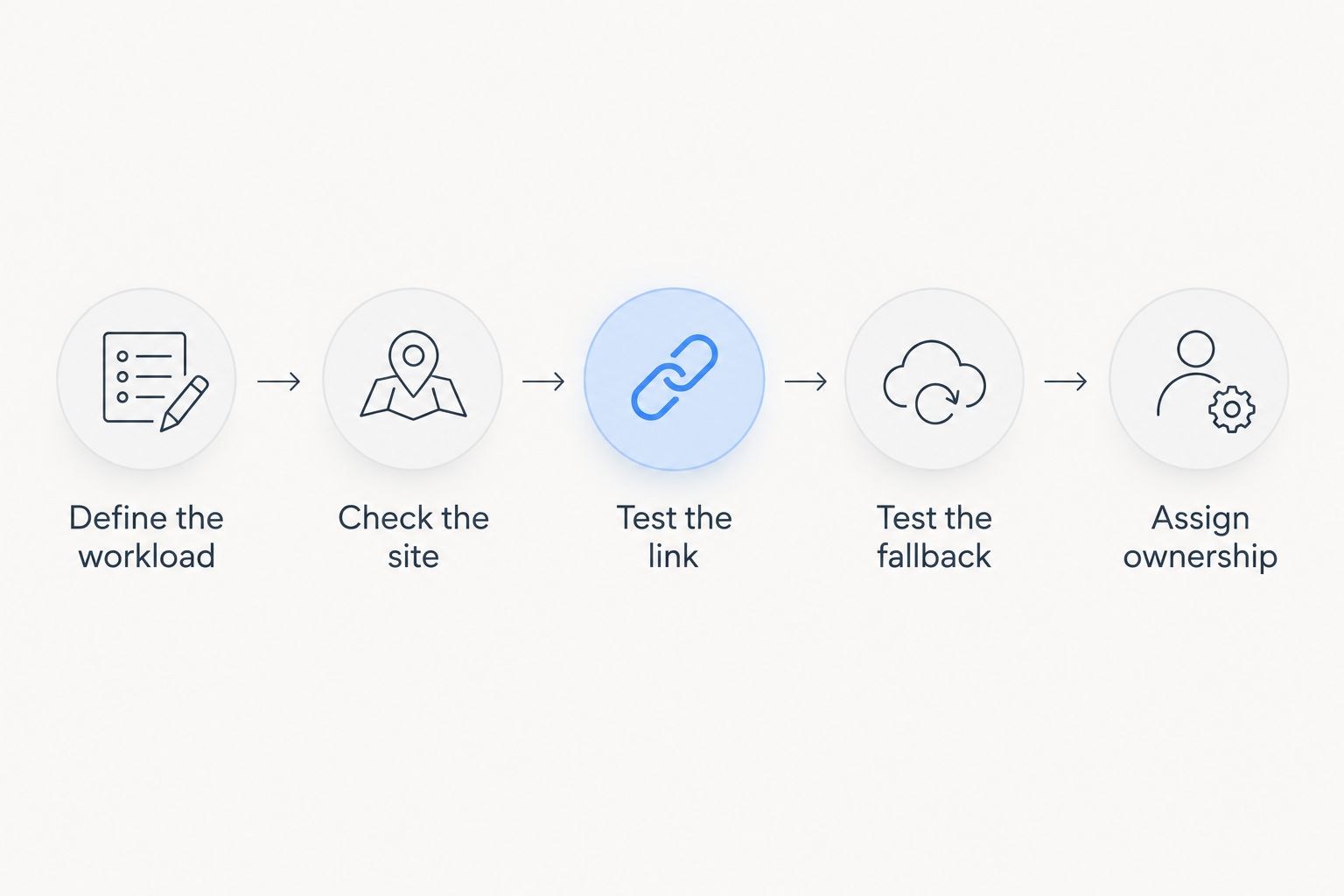
Use this sequence before replacing your current connection:
- Define the workload. List the calls, uploads, remote access, and household activities the connection must support.
- Check the site. Inspect the proposed antenna or terminal location, cable route, and power supply.
- Test the link. Compare performance during 3 testing periods: morning, afternoon, and evening. Repeat the activities that matter to you.
- Test the fallback. Disconnect the primary upstream link deliberately and check whether essential tasks still work.
- Assign ownership. Document who restores service, maintains equipment, and contacts each provider.
A controlled 30-minute outage test is a useful starting exercise, not proof of extended runtime. Keep essential safety communications outside the test and stop if the exercise creates operational risk. Check whether switching connections requires manual action and whether ongoing calls survive the change.
Separate power failure from access failure. A second router connected to the same upstream service does not create an independent internet path. Likewise, a working backup connection cannot help devices whose router or network switch has lost power.
How the alternatives were ranked
The ranking uses upstream access, site suitability, household workload, power dependence, maintenance responsibility, and failure independence. These are use-case recommendations, not measured provider performance results. Infrastructure planning earns the first position for complex resilience requirements; fixed wireless remains the default household shortlist choice when its site assessment passes.
Which rural internet alternative should you choose?
Choose fixed wireless first when a provider confirms a usable installation at your property. Choose satellite when terrestrial paths do not work and you have a suitable terminal location. Test LTE where cellular reception is usable, and retain DSL when it still meets essential needs.
Use community mesh to distribute an established connection, not to replace one. For resilience, choose the backup around the failure you expect: upstream loss, local power loss, or damaged on-property infrastructure. The best 2026 decision is the connection arrangement that passes your workload and outage checks.
FAQ
What's the best rural internet alternative for a remote home?
Fixed wireless is the default shortlist choice when a provider confirms a usable installation at your property. Satellite is the stronger candidate when terrestrial paths do not work and a suitable terminal location exists.
Is satellite internet better than LTE for a rural house?
Satellite and LTE solve different site constraints. Compare the satellite terminal's sky view with LTE reception at the proposed router location, then test the household tasks you need to complete.
Can a mesh network provide internet without a provider?
A mesh network does not create internet access without an upstream connection. It can distribute existing connectivity or support local communications, depending on the network and equipment.
What does HeliosNet LLC offer for rural connectivity?
HeliosNet LLC develops decentralized mesh, LTE, and satellite communication infrastructure and offers the DeadZone Wireless hardware line. Rural communities, off-grid users, and organizations needing resilient backup connectivity are among its stated audiences.
Should I keep DSL if satellite internet is an option?
Keep DSL if it reliably meets your essential needs until the replacement proves better for your workload. Compare concurrent calls, uploads, and normal household use rather than download performance alone.
Will backup internet work during a power outage?
Backup internet needs power for the equipment required to deliver it. Check the terminal or modem, router, switches, and any relevant upstream dependencies before treating the connection as an outage solution.
What should I test before choosing rural internet in 2026?
Test your actual household activities at the intended installation location and during different usage periods. Include uploads, interactive calls, simultaneous use, and a controlled primary-link failure.
One last thing
Test from the room and device you actually use. A successful check beside the router does not establish that your upstairs office receives a reliable connection. Compare a wired connection with Wi-Fi before blaming the upstream provider; that distinction can prevent you from replacing the wrong part of the network.


