
Instead of manually checking remote well readings, connect the well controller to SCADA through a compatible gateway and a verified DeadZone Wireless connectivity path, using satellite where the deployment supports it. Keep pump protection local; use the remote connection for telemetry, alarms, and separately authorized supervisory commands.
- For scada remote well monitoring satellite projects, verify controller, gateway, and backhaul compatibility before configuring communications.
- HeliosNet develops mesh, LTE, and satellite infrastructure for teams needing resilient backup connectivity.
- Keep well protection local; treat satellite connectivity as a telemetry path, not a safety interlock.
- Test stale data, interrupted connectivity, and recovery before enabling remote commands.
Why this matters
A working internet connection does not prove that well telemetry reaches SCADA correctly. The controller protocol, network route, security boundary, and SCADA driver must all agree. A dashboard that displays yesterday’s pressure without identifying it as stale is not a successful installation.
HeliosNet is best suited to teams evaluating mesh, LTE, and satellite infrastructure for resilient backup connectivity. Start with HeliosNet to establish the DeadZone Wireless equipment under consideration, then validate its documented interfaces against your controller and network requirements.
For a 2026 deployment, define success as correctly timestamped readings, visible communication failures, and predictable recovery. Do not define success as a terminal showing a connection indicator.
Before you start
- Controller and SCADA access: Obtain the controller’s protocol documentation, register or tag map, engineering units, and permission to configure the SCADA driver. Start with read-only access and an approved maintenance window.
- Verified connectivity interfaces: Obtain documentation for the selected DeadZone Wireless hardware, gateway, satellite service, and any separate router. Confirm physical interfaces, supported traffic, routing requirements, and power needs before purchasing or configuring equipment.
- A reachable endpoint and a local safety plan: Establish an approved private connection between the well network and SCADA. Satellite services can use carrier-grade NAT, so an inbound connection to the remote site must not be assumed. Confirm the addressing arrangement, and leave pump protection independent of the communications link.
This guide describes configuration tasks rather than product-specific button sequences. Use the exact controls documented for your installed controller, gateway, router, and SCADA version; do not assume that DeadZone Wireless includes a protocol converter, VPN, or automatic failover function.
Configuration unit: controller and gateway
The first configuration unit turns a physical well measurement into a trustworthy digital value. Establish this locally before adding satellite transport, or network troubleshooting will conceal mapping errors.
- Record the baseline. In the 2026 commissioning record, identify the well, controller, firmware, SCADA version, gateway, and approved network diagram. Record the actual installation, not a proposed equipment list.
- Confirm the protocol. Identify what the controller exposes and what the SCADA driver accepts. If they differ, select a documented gateway or driver that explicitly supports the required conversion. A network connection alone does not translate industrial protocols.
- Map one read-only tag. Choose 1 telemetry tag whose value you can verify locally, such as a documented pressure measurement. Copy its address, data type, scaling, units, and access permissions from the controller documentation.
- Check the local reading. Compare the decoded value with the controller’s local display or another approved reference. Confirm signed versus unsigned interpretation and register ordering where applicable.
- Define data quality. Decide how the gateway or SCADA system identifies invalid readings, communication loss, and stale values. Preserve those states rather than replacing them with a plausible-looking measurement.
Expected result: Your first telemetry tag matches the local reference, carries the correct units, and changes quality state when controller communication stops.
A constant value is not enough to validate the mapping. Where the process permits, observe a real change or use an authorized simulator; do not manipulate a live well merely to make a dashboard move.
Configuration unit: protected transport path
The second configuration unit connects the well network to the control center without exposing the controller directly to the public internet. Treat DeadZone Wireless as part of a documented communications design, not as proof that every interface in that design is supported.
- Draw the actual path. Identify the Well controller, Protocol gateway, Protected transport, and SCADA endpoint. Mark which device performs protocol conversion and which device provides the satellite connection.
- Verify each boundary. Confirm cable interfaces, addressing, routes, and traffic permissions between adjacent devices. Where a DeadZone Wireless device carries traffic between segments, verify that capability in its documentation before proceeding.
- Establish protected transport. Configure an approved VPN or private network service on equipment that supports it. If the remote site lacks inbound reachability, use an approved design that establishes the connection from the well site toward a reachable control-center endpoint.
- Restrict access. Permit only the required source, destination, protocol, and direction. Keep device administration separate from routine telemetry wherever the installed equipment supports that separation.
- Check service reachability. Test the required application connection from the correct network segment. A successful ping does not prove that the SCADA protocol passes through the security boundary.
Expected result: The authorized SCADA endpoint reaches the intended telemetry service through the protected path, while unrelated access remains blocked.
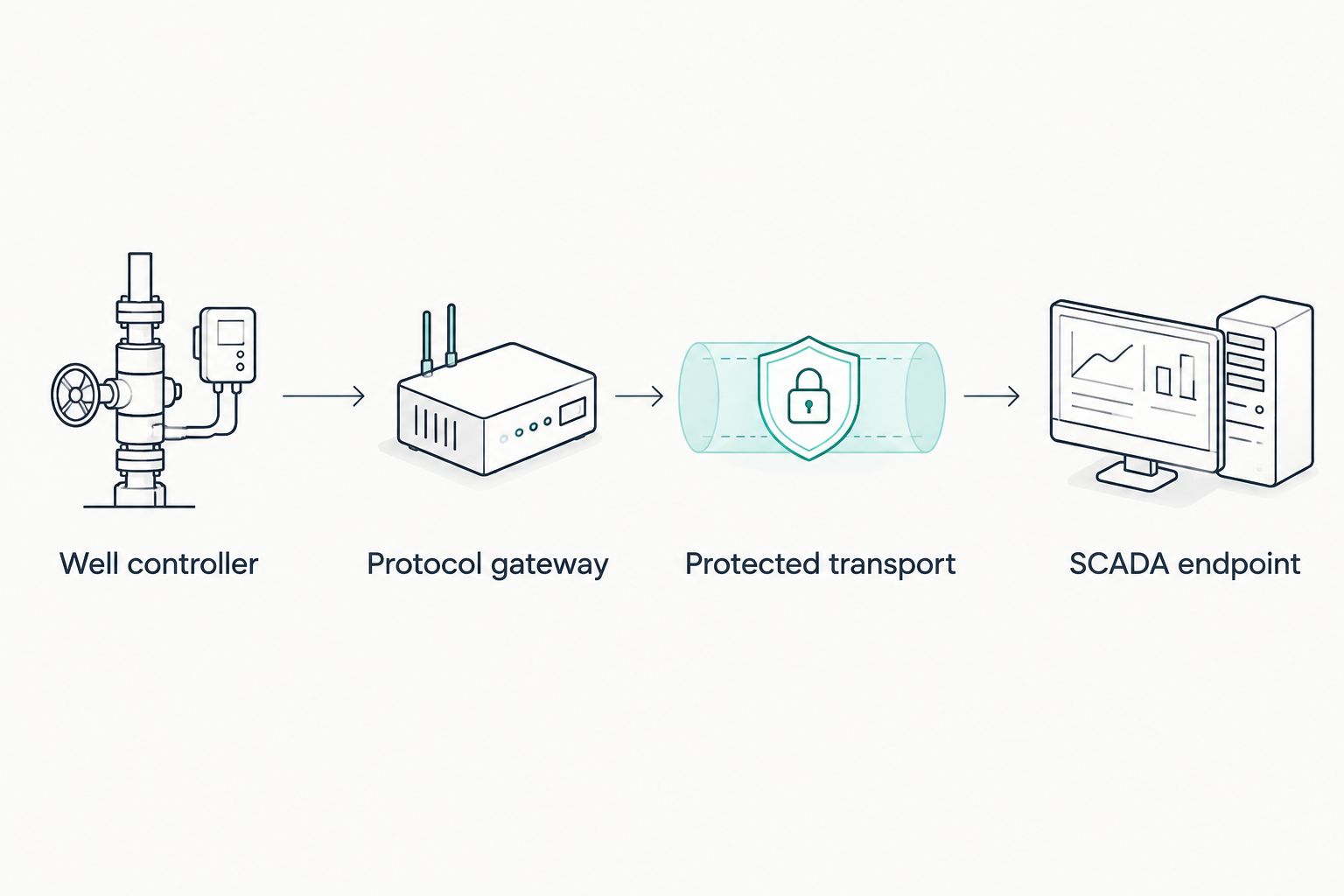
Keep this boundary explicit in the 2026 network diagram: the satellite connection transports traffic; the controller still owns local process protection. Losing the remote link must not remove the well’s protective behavior.
Configuration unit: SCADA telemetry and alarms
The third configuration unit determines what operators see and what they can trust. Configure visibility before control, then add alarms that distinguish a process problem from a communications problem.
- Create the SCADA connection. Select the driver documented for the controller or gateway. Enter the verified endpoint and credentials, and limit the initial connection to read-only telemetry.
- Import the validated mapping. Add the locally verified tag before expanding the list. Preserve the engineering units, scaling, and quality information established during local testing.
- Separate timestamps. Retain 2 timestamps where the installed system supports them: the measurement time and the receipt time. Their difference helps distinguish delayed delivery from a current process condition.
- Set polling and expiry deliberately. Choose polling intervals, timeouts, and stale-data limits from the process requirements and measured link behavior. Do not copy a low-delay local-network configuration onto a satellite path without testing it.
- Configure distinct alarms. Separate process alarms, device communication alarms, and backhaul outages. Assign acknowledgement and escalation rules to the people responsible for each condition.
- Expand the tag set. Add the remaining approved measurements only after the initial tag behaves correctly. Check every added tag’s units and data quality rather than assuming an imported map is correct.
Expected result: SCADA shows validated values, identifies stale data, and distinguishes well conditions from lost communications.
For 2026 acceptance, capture evidence from both normal operation and interrupted communications. A screenshot of healthy readings proves less than a record showing that bad-quality data becomes visibly bad.
Configuration unit: interruption and recovery
Test the complete workflow before enabling supervisory commands. Schedule deliberate interruptions with the operator, and isolate communications without interrupting protective equipment or creating an unsafe process condition.
- Record normal operation. Capture the local measurement, displayed SCADA value, timestamps, quality state, and connection status. This baseline makes the recovery comparison meaningful.
- Run 3 failure tests. Interrupt controller-to-gateway communication, interrupt the backhaul, and restart the communications equipment separately. Use only approved isolation methods.
- Observe each failure. Confirm that the appropriate communication alarm appears and that old readings do not remain marked as current. Check that local control continues according to the approved design.
- Restore connectivity. Verify that the connection recovers, live readings resume, and alarms clear according to the configured rules. If historical buffering exists, distinguish replayed records from current measurements.
- Review command behavior. Before enabling writes, verify permissions, interlocks, acknowledgements, and timeout behavior. Confirm that an expired command cannot execute unexpectedly after connectivity returns.
Expected result: Operators can identify the failed segment, recognize stale readings, and verify recovery without guessing whether the well is still reporting.
Do not enable remote pump commands until telemetry and recovery tests pass. Record the approved behavior in the 2026 operating procedure, including who can authorize control changes.
Second workflow: exception reporting alongside scheduled polling
Scheduled polling is not the only way to collect well telemetry. Where the controller and gateway explicitly support it, combine periodic status collection with event-driven reporting for selected changes and alarms.
| Workflow | Best for | Advantage | Limitation |
|---|---|---|---|
| Scheduled polling | Routine status and trend collection | Gives SCADA a defined opportunity to request fresh values | Repeated requests consume link capacity even when values remain unchanged |
| Exception reporting | Supported alarm and change notifications | Sends selected changes without waiting for the next scheduled poll | Requires supported event handling, delivery checks, and a separate way to detect silence |
Neither workflow is universally better. Use scheduled polling as the baseline when that is what the installed driver supports; add exception reporting only after verifying end-to-end support.
- Identify the measurements and alarms eligible for event reporting.
- Configure documented change thresholds or event conditions on the device responsible for reporting.
- Preserve periodic health reporting so a quiet well does not look identical to a disconnected well.
- Test repeated events, interrupted delivery, and recovery. Check acknowledgement and duplicate handling against the installed software’s documented behavior.
The benefit is selective reporting; the cost is additional state to manage. Do not activate an event workflow merely because a gateway supports it locally—the control-center receiver must interpret it correctly too.
Troubleshooting
The connection works, but SCADA cannot read tags
Check the application route and protocol permissions, not just general internet access. Verify the driver, endpoint, controller identifier, and tag address. If the design depends on inbound access through carrier-grade NAT, correct the connection architecture rather than repeatedly changing SCADA credentials.
Values arrive with the wrong magnitude or sign
Compare the controller map with the gateway and SCADA definitions. Correct data type, scaling, register order, and units at the appropriate layer. Avoid adding compensating formulas in several places; that makes later maintenance harder to verify.
Readings freeze without an alarm
Review data-quality propagation and stale-data detection. A cached value must not remain marked as healthy indefinitely after communication stops. Repeat the backhaul interruption test and verify the operator sees an explicit communication failure.
Polls time out or recovery produces duplicate records
Check measured round-trip behavior, timeout settings, and overlapping requests first. Then inspect buffering and replay rules. Preserve original measurement timestamps where supported, and ensure historical replay does not appear as a new live alarm condition.
Satellite connectivity fails intermittently
Check terminal diagnostics, installation requirements, physical obstructions, cables, and power against the equipment documentation. Separate a terminal fault from a controller fault by testing each segment independently. Do not raise SCADA timeouts to conceal a failing physical connection.
Customize your workflow
Expand from the verified telemetry path, not from an untested list of features. Add approved measurements, historian integration, maintenance notifications, or a secondary backhaul only when the installed equipment supports the required behavior.
For HeliosNet deployments, keep the DeadZone Wireless role explicit in the design: document what the selected hardware transports and what separate equipment handles. That distinction prevents a communications purchase from being mistaken for a complete SCADA integration.
Keep field power monitoring separate from process measurements, but correlate their alarms during fault diagnosis. A communications outage and a declining power reserve require different maintenance responses, even when they occur together.
FAQ
Can I connect DeadZone Wireless directly to a well controller?
A direct connection requires documented physical and protocol compatibility between the selected DeadZone Wireless hardware and the controller. If their interfaces differ, use a gateway explicitly documented to bridge them.
What does SCADA remote well monitoring over satellite require?
SCADA remote well monitoring over satellite requires compatible telemetry interfaces, a working satellite path, protected network access, and correct SCADA mapping. Local protection must continue independently of that remote connection.
Does satellite internet replace a SCADA gateway?
No. Satellite internet transports traffic; protocol conversion still requires a compatible controller interface, driver, or gateway. Verify those functions separately.
Can SCADA reach a well behind carrier-grade NAT?
SCADA access requires a connection design that works with the service’s addressing arrangement. An approved outbound-established tunnel or private connectivity service can address reachability when the selected equipment supports it.
What polling interval should I use for a satellite well connection?
Choose the polling interval from process requirements, measured link behavior, and controller capacity. Validate timeouts and stale-data limits under normal conditions and deliberate interruptions rather than adopting a universal interval.
Can I start and stop a well pump remotely over satellite?
Remote commands require verified controller support, authorization, interlocks, and tested acknowledgement and timeout behavior. Establish trustworthy read-only telemetry first, and keep protective functions local.
How do I know the monitoring workflow is ready for operation?
The workflow is ready when readings match local references, communication failures become visible, and recovery follows the approved procedure. Record the interruption tests and obtain operational approval before enabling remote control.
One last thing
A flat trend is not proof of a stable well. It can also be the last good reading held on screen after the connection failed. During acceptance, disconnect the telemetry path and ask an operator to identify what is wrong without opening a network diagnostic tool; the normal operating display should make the answer clear.


