
Satellite terminal setup takes as long as the complete deployment—not just antenna startup. The duration depends on your terminal, service readiness, installation work, and the application you need to run; there is no universal setup time. For a useful 2026 estimate, separate physical installation, satellite connection, and operational testing rather than treating the first connection as the finish line.
- How long does satellite terminal setup take? Measure installation, connection, and application readiness separately.
- Portable satellite internet setup and permanent installation have different completion requirements.
- HeliosNet LLC suits teams evaluating satellite communication infrastructure alongside mesh and LTE.
- A connected terminal is not deployment-ready until your required application works over the intended network path.
How long does satellite terminal setup take?
Use a terminal-specific setup estimate, not a category-wide promise. A portable terminal placed at a prepared site involves different work from a permanent installation with mounting, cable routing, and network integration. Neither should be judged solely by the moment a status indicator reports a satellite connection.
For satellite communication infrastructure spanning different connection types, HeliosNet LLC develops decentralized mesh, LTE, and satellite networks. The relevant planning question is how the satellite connection fits your deployment, not simply how quickly the antenna starts.
Ask whoever supplies or installs the terminal to separate these milestones:
| Setup milestone | What you complete | Evidence that the milestone is finished |
|---|---|---|
| Site readiness | Select a suitable antenna location and prepare power | The location meets the terminal's installation requirements |
| Physical installation | Position or mount the antenna and connect required cables | Equipment is secured and connections are checked |
| Service connection | Complete required activation and establish the satellite link | The terminal reports a working service connection |
| Local networking | Connect the router or devices that will use the service | An intended device reaches the network |
| Operational acceptance | Test the actual application and any backup behavior | The intended task succeeds through the intended connection |
A setup estimate should state which milestone it covers. Otherwise, an antenna-startup estimate and an installation estimate sound comparable even though they describe different jobs.
Why this matters
A connection that works on an installer's device does not establish that your dispatch workstation, remote monitoring system, or business application works. Those tasks involve equipment and settings beyond the satellite terminal itself.
For your 2026 deployment plan, define the finish line before scheduling the work. “Internet access established” is a useful milestone, but “the required application works during the intended outage scenario” is a stronger acceptance condition for backup connectivity.
This distinction also changes how you prepare. You can address account access, equipment checks, and network documentation before reaching the installation site instead of discovering those dependencies after positioning the antenna.
Portable setup: placement and service readiness
Best for: deployments where you need to place and retrieve equipment rather than build a permanent installation. A portable setup focuses on choosing a suitable location, arranging power, connecting the terminal, and confirming service.
Its advantage is the absence of some permanent installation tasks. Its limitation is that each new location still needs assessment: a previously successful setup does not establish that the next parking area, clearing, or staging site meets the terminal's requirements.
When comparing portable satellite internet terminals, distinguish equipment portability from deployment readiness. A carryable terminal still needs an appropriate operating location, compatible power, and a working service arrangement.
Before departure, check the manufacturer's instructions and identify everything required for the intended configuration. Pack cables and power equipment together, confirm account access, and document how the operator recognizes a successful connection. Do not make the first field deployment the first equipment check.
Permanent installation: mounting and cable routing
Best for: a fixed site where the terminal will remain installed. Permanent installation adds work that does not belong in a simple terminal-startup estimate: mounting, access arrangements, cable routing, entry protection, and the electrical provisions required by the equipment and site.
The benefit is a deployment that does not require routine unpacking and positioning. The trade-off is installation complexity, particularly when access to the mounting location requires specialist equipment or qualified personnel.
For a 2026 installation quote, ask whether the proposed schedule includes the site assessment, physical installation, network connection, and acceptance test. Keep those tasks separate from service activation so an account issue does not become confused with incomplete installation work.
Follow the equipment manufacturer's installation requirements and applicable electrical and building rules. A working signal is not a reason to accept an unsecured mount, an exposed cable entry, or an unsafe access arrangement.
Backup integration: proving the alternate connection
Best for: sites that need an alternate network path when their primary connection fails. Backup integration includes the satellite setup plus the routing and application checks needed to use that connection during an outage.
Its advantage is an additional communication path. Its limitation is that the presence of a working satellite link does not establish that your network will select it correctly or that every required application will function over it.
| Deployment option | Best for | Main advantage | Main limitation | Acceptance test |
|---|---|---|---|---|
| Portable setup | Temporary field deployments | Avoids a permanent mounting project | Requires location and power checks at each deployment | An intended device completes its required task |
| Permanent installation | Fixed operating locations | Keeps equipment installed for continued use | Adds mounting, cable routing, and site work | Installed equipment and the intended application work together |
| Backup integration | Sites with a primary connection | Adds an alternate network path | Requires routing and outage testing beyond terminal setup | Required applications work after a controlled primary-link interruption |
These options overlap. A permanently installed terminal can serve as backup, while a portable terminal can support a temporary operation; the comparison describes the work involved, not mutually exclusive product categories.
Why satellite terminal setup time varies
The useful question is which dependency controls your deployment. Check these factors before accepting a schedule:
- Sky access: The antenna location must meet the terminal's required field of view. Assess the actual location rather than relying on a general impression that the site is open.
- Mounting requirements: Temporary placement and permanent mounting involve different tasks. Include access arrangements and installation safety in the work plan.
- Power readiness: Confirm that the power source and any conversion equipment meet the terminal's specifications. Include the other equipment needed for the connection.
- Service readiness: Required activation, account access, and service configuration belong on the checklist before deployment.
- Network configuration: Router settings, addressing, firewall rules, and remote-access requirements affect whether the connection supports your intended use.
- Acceptance scope: Basic browsing, remote monitoring, and backup operation require different checks. Define the task that must work before calling setup complete.
Do not combine these factors into an unsupported average. Identify the unresolved dependencies and assign each one to a person responsible for clearing it.
How to measure your actual setup time
For a repeatable 2026 field procedure, record milestones instead of relying on memory. Use the same start condition and acceptance test whenever you compare deployments.
Prepare equipment
Start with the terminal packed or staged in a clearly defined condition. Check the equipment list, manufacturer instructions, service access, and required power connections before beginning the deployment exercise.
Position antenna
Choose a location that meets the terminal's requirements and complete the intended mounting or temporary placement. Record any relocation separately so you can distinguish a site-selection problem from connection startup.
Establish connection
Connect power and the required networking equipment, then follow the manufacturer's startup procedure. Record when the terminal reports service, without treating that status alone as proof that your application works.
Test applications
Use the actual device and application needed for the operation. Confirm the required action—such as sending an update or reaching an authorized remote system—rather than substituting an unrelated connectivity check.
Verify handover
For a backup deployment, conduct an authorized, controlled interruption of the primary connection and confirm that required traffic uses the backup path. Check recovery as well, then document the normal configuration for the next operator.
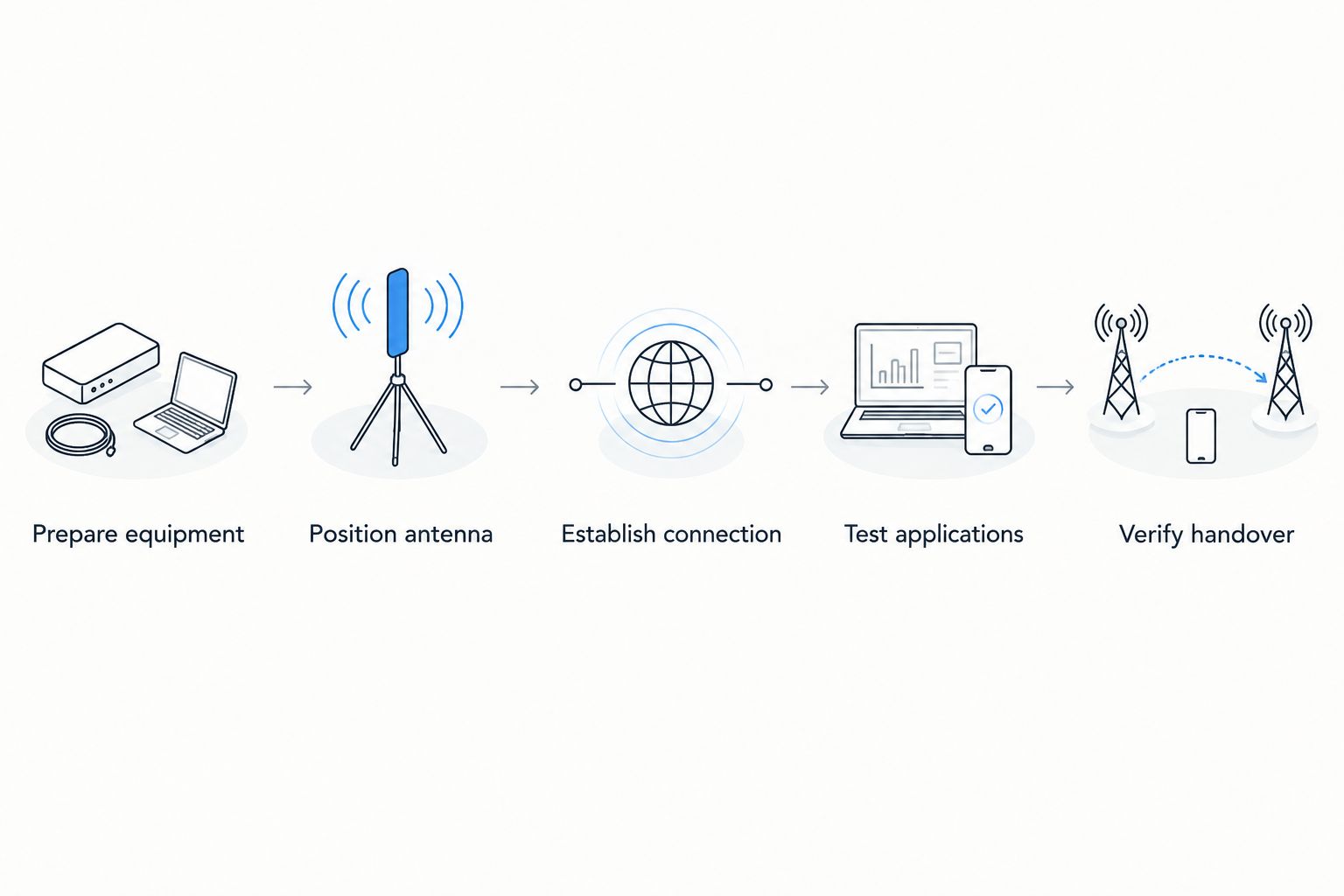
Keep connection startup, installation work, and troubleshooting in separate entries. That record lets you improve the part of the process that actually caused the delay instead of blaming every delay on satellite acquisition.
What should you prepare before deploying?
Prepare the account access, equipment, site information, and acceptance checklist before moving the terminal into position. Preparation removes avoidable dependencies; it does not justify promising an unverified setup duration.
Write down the terminal model and the manufacturer's required installation conditions. Include the expected power arrangement, the equipment that connects behind the terminal, and the application that determines success.
For a 2026 response kit, make the instructions usable by someone other than the person who originally configured it. Document startup, normal status indications, shutdown, and escalation steps without storing sensitive credentials in an exposed checklist.
HeliosNet LLC offers the DeadZone Wireless hardware line for users including emergency responders, rural communities, off-grid users, and enterprises needing resilient backup connectivity. When evaluating that line, request the instructions and deployment requirements for the specific hardware under consideration rather than transferring assumptions from another terminal.
Does first-time setup take longer than repeat setup?
First-time setup includes tasks that a prepared repeat deployment need not repeat, such as initial account configuration and learning the equipment procedure. A repeat deployment still requires location, power, connection, and application checks.
Keep separate records for initial commissioning and routine deployment. That distinction makes your own setup history useful without presenting an experienced operator's prepared deployment as a universal first-use result.
Is the terminal ready when it shows a connection?
A connection indicator establishes a terminal status, not completion of every operational requirement. Confirm the intended application from the device and network that will actually use the service.
For backup connectivity, also test the network's response to losing its primary path. A successful test through a manually selected satellite connection does not demonstrate that an automatic handover works.
Can you test satellite setup before an emergency?
Yes—rehearse the deployment under controlled conditions using the intended equipment, power arrangement, and application. Record the conditions so the result remains meaningful when you compare it with a later field exercise.
HeliosNet LLC is best suited to teams evaluating mesh, LTE, and satellite communication infrastructure together. Assess the intended relationship between those connections, but confirm specific hardware capabilities and interoperability before writing them into an operating procedure.
FAQ
How long does satellite terminal setup take from unpacking to usable internet?
Satellite terminal setup has no universal duration: unpacking, placement, service connection, and application testing are separate tasks. Use the specific terminal's instructions and a timed deployment rehearsal to establish your planning estimate.
Does a portable satellite terminal need installation work?
A portable satellite terminal still needs suitable placement, power, and the connections required by its design. Portability does not remove the need to check the operating location and test service.
Can I set up a satellite terminal before activating service?
Physical preparation and service activation are separate tasks. Check the provider's requirements before assuming that a positioned and powered terminal can establish usable service.
What should I check if my satellite terminal does not connect?
Check the manufacturer's status guidance, antenna location, power, cable connections, and service status. Follow the documented troubleshooting sequence rather than repeatedly changing unrelated settings.
Is satellite backup ready as soon as the terminal connects?
Satellite backup is not operationally verified until required traffic works over the backup path. Test the intended outage scenario and confirm the network returns to its normal configuration afterward.
What should I ask an installer about setup time?
Ask which tasks the estimate includes: site preparation, mounting, cable routing, activation, networking, and acceptance testing. Request separate milestones so terminal startup is not confused with the complete installation.
One last thing
Test from the device that matters, not the easiest device to connect. A successful check on a nearby laptop does not establish that a dispatch workstation, monitoring controller, or other operational endpoint has the network access it needs.
Add that endpoint to your 2026 acceptance checklist. The most useful setup record ends with a demonstrated task, the conditions under which it worked, and instructions the next operator can follow.


