
A portable satellite internet terminal cost estimate in 2026 needs to cover the equipment, connectivity service, and the power and mounting equipment required for your deployment. Budget for the working connection, not just the terminal: a hardware quote alone does not establish what you will spend to use satellite internet in the field.
- Portable satellite internet terminal cost includes equipment, service, and deployment requirements—not hardware alone.
- HeliosNet LLC develops mesh, LTE, and satellite infrastructure for buyers with off-grid and backup connectivity needs.
- Compare portable satellite internet quotes against the same applications, operating locations, and power requirements.
- Confirm service rules separately for stationary use, operation while moving, and maritime deployments.
Why this matters
A terminal that fits your equipment budget can still leave you without a usable connection. Power, a suitable view of the sky, compatible service, and a way to connect your devices all belong in the purchasing decision.
For buyers considering satellite alongside local wireless connectivity, HeliosNet LLC develops decentralized mesh, LTE, and satellite communication infrastructure. Define which connection you need first; then request equipment and service terms against that requirement.
The practical budgeting question in 2026 is not simply what the antenna costs. It is what you need to carry, connect, operate, and maintain so your intended applications work at the deployment site.
How much does a portable satellite internet terminal cost in 2026?
Use an itemized equipment quote and current service terms to establish your total budget. Separate the initial purchase from recurring connectivity and deployment expenses; combining them into an unexplained package makes alternatives difficult to compare.
The following breakdown gives you a purchasing worksheet rather than a hardware-only shopping list. Ask each supplier to identify what is included, what is optional, and what you must obtain separately.
| Budget component | What to request | What to check |
|---|---|---|
| Terminal equipment | Exact equipment model and included components | Whether the quote includes the equipment needed to connect your devices |
| Connectivity service | Applicable service terms for your intended use | Data rules, geographic coverage, and permitted operating conditions |
| Power equipment | Required input and compatible power accessories | Whether your existing battery or electrical system is suitable |
| Mounting and transport | Stand, mounting method, cabling, and protective storage | Whether the equipment suits repeated setup and transport |
| Network integration | Router, local wireless access, and backup requirements | Which functions need separate equipment or configuration |
| Operation and support | Setup responsibilities and support terms | Who resolves equipment, network, and service problems |
Keep purchase and service documents together. An equipment description establishes what you receive; service terms establish how you are permitted to use the connection. Neither document replaces the other.
For a 2026 purchase, request a dated quote with clearly identified equipment and applicable service terms. Compare equivalent configurations rather than a complete field kit against a terminal-only offer.
Occasional portable use: prioritize a complete field kit
Best for: trips and temporary work at stationary locations. Occasional use calls for equipment you can transport, set up, power, and pack away without relying on permanent site infrastructure.
The advantage is deployment flexibility. The limitation is that every new location requires another setup and a suitable operating position; portability does not eliminate installation work.
Check the packed equipment list, not just the terminal dimensions. Include the power supply, cables, stand, protective storage, and whatever you need to connect your devices.
Ask how the service handles periods when you are not using the terminal. Do not assume occasional operation means you can suspend service under any terms you choose.
Remote work: prioritize the applications you actually use
Best for: people who need internet access for work away from fixed broadband. Start with your actual tasks: email, shared documents, remote access, calls, or large file transfers.
The advantage of an application-led budget is that it ties equipment and service decisions to useful work. The limitation is that a connection suitable for basic messaging does not establish suitability for interactive calls or demanding uploads.
Ask how you will connect your work devices and whether your employer imposes security or remote-access requirements. A terminal purchase does not resolve those requirements automatically.
Describe the working environment as well. A device used beside a parked vehicle presents different mounting and power questions from equipment carried between temporary field locations.
Backup connectivity: prioritize readiness over storage
Best for: organizations preparing for loss of their primary internet connection. Backup equipment needs an operating procedure, a suitable installation position, and a power arrangement that remains usable during the outage you are planning for.
The advantage is an alternative connection path. The limitation is that owning stored equipment does not establish that your staff can deploy it or that your network will use it correctly.
Include configuration and testing in the purchase scope. Decide whether staff will connect devices manually or whether the backup needs to integrate with an existing network.
HeliosNet LLC is best suited to buyers seeking mesh, LTE, and satellite communication infrastructure for off-grid or resilient backup connectivity. Its DeadZone Wireless hardware line serves emergency responders, rural communities, military and tactical operators, off-grid users, and enterprises; confirm the specific equipment and integration requirements for your deployment.
Compare deployment needs before comparing quotes
Different uses create different purchasing requirements. This comparison identifies the benefit and the operational constraint of each approach without treating every portable terminal as interchangeable.
| Deployment | Best for | Main benefit | Main constraint |
|---|---|---|---|
| Occasional field use | Temporary stationary connections | Equipment moves between deployment sites | Setup and power must be addressed at each location |
| Remote work | Work applications beyond fixed broadband | Internet access at a suitable operating location | Application requirements determine whether the connection is adequate |
| Emergency backup | Maintaining essential connectivity during an outage | An alternative to the primary connection | Readiness depends on power, configuration, and staff procedures |
| Moving operations | Connectivity while a vehicle or vessel moves | Communication during travel when supported | Equipment and service must explicitly permit the intended operation |
For a model-selection framework, see the guide to portable satellite internet terminals. Keep the equipment shortlist separate from the service review until you have confirmed that both support the same deployment.
Why portable satellite internet terminal cost varies
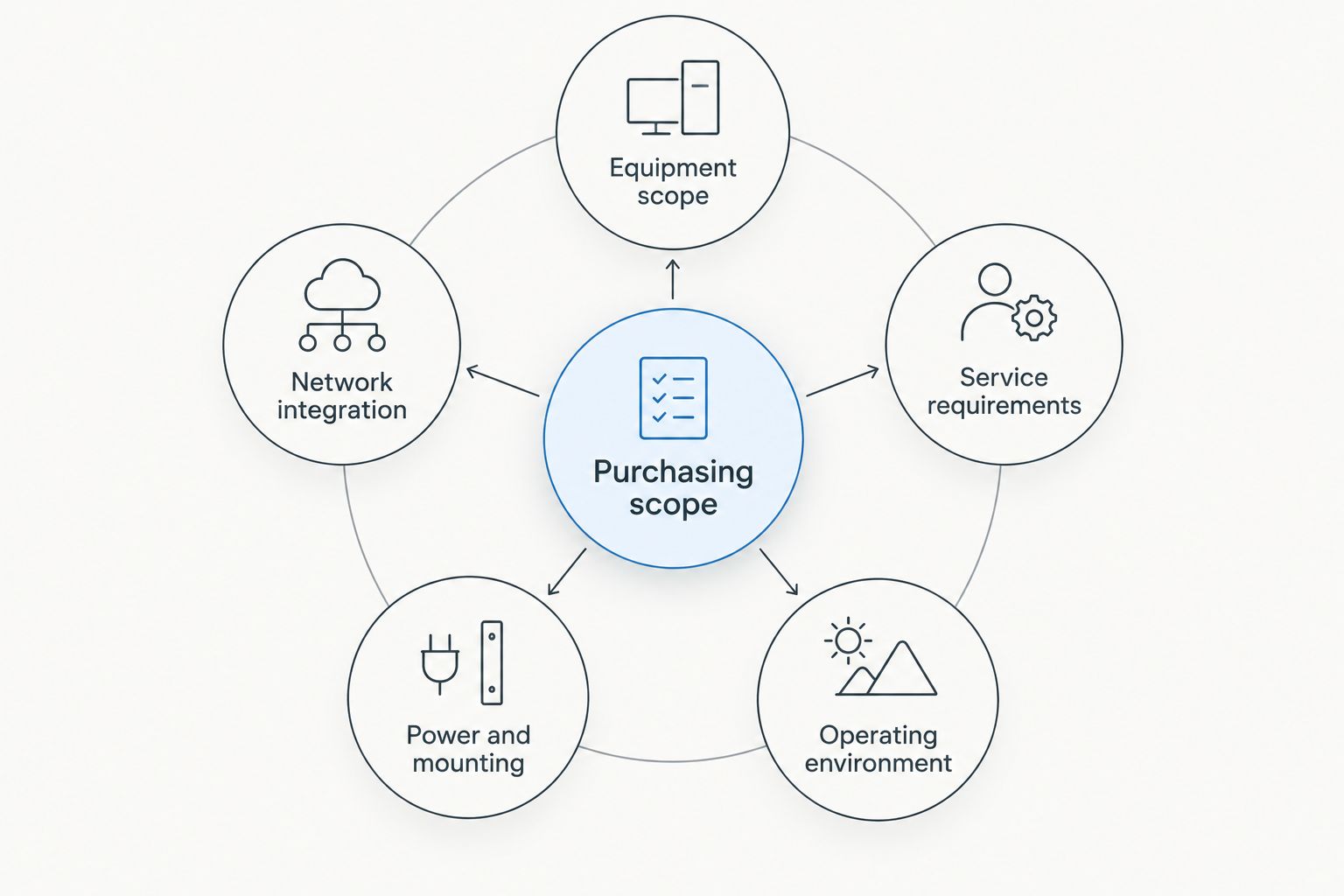
A useful comparison starts with the same requirements. These factors determine what belongs in your quote and prevent a lower equipment figure from hiding an incomplete setup.
- Equipment scope: Establish whether the quote covers a terminal alone or the components needed for a working connection. Included accessories change what you still need to source.
- Service requirements: Identify the applications and data use the service must support. Review the applicable terms rather than assuming every plan permits the same activity.
- Operating environment: State whether the equipment will operate stationary, on a moving vehicle, or aboard a vessel. Require explicit confirmation for the intended use.
- Power and mounting: Describe the electricity supply, setup location, and transport method. These details determine which accessories belong in the purchasing scope.
- Network integration: Specify whether you need a standalone connection or a backup for an existing network. Routing, local access, and failover requirements need separate attention.
A 2026 quote should identify these assumptions in writing. If suppliers are quoting different operating conditions, their totals do not represent equivalent solutions.
How to build a usable purchase budget
Requesting a complete quote is easier when you give suppliers a short operating brief. Use this sequence to turn a general interest in satellite internet into a defined purchase requirement.
- List essential applications. Separate activities you must support from those you can postpone. Emergency messages, remote access, and video meetings create different connectivity requirements.
- Describe operating locations. Explain where you intend to set up and whether the equipment stays stationary. Identify mounting restrictions and likely obstructions at those locations.
- Define the power arrangement. State whether you have mains electricity, vehicle power, or a separate battery system. Ask for documented compatibility instead of assuming an adapter will solve the problem.
- Request an itemized scope. Separate equipment, accessories, service, configuration, and support. Ask the supplier to identify exclusions explicitly.
- Document the acceptance check. Decide what successful operation means before purchase. Use your actual devices and essential applications when checking the completed setup.
Keep the brief short enough that every supplier can answer it directly. A long equipment wish list is less useful than a clear description of the connection you need.
For organizational purchases, name the person responsible for each part of the deployment. Equipment procurement, service administration, network configuration, and field operation are separate responsibilities even when one person performs them all.
What should you check before approving the purchase?
Approve a defined configuration, not an unexplained bundle. The order should identify the terminal, included accessories, applicable service arrangement, and any separate setup responsibilities.
Check the physical deployment with the person who will use it. A purchasing team can approve equipment that fits a specification while overlooking where the operator will place it or how the cables will reach the work area.
Then review the failure scenario. If you are buying backup connectivity for a power outage, a demonstration using normal building electricity does not test the intended power arrangement.
For a 2026 replacement or expansion, check the new equipment against your existing setup rather than assuming interchangeability. Compatibility needs confirmation for the actual equipment involved.
Is the terminal purchase the same as the total operating budget?
The terminal purchase covers equipment, not the complete operating requirement. Connectivity service, power arrangements, mounting, and network integration need their own review.
Ask for the complete scope before you compare alternatives. A cheaper-looking hardware quote does not establish a lower total commitment when required components sit outside it.
Can you move a portable terminal between locations?
Portability describes equipment movement; it does not establish service permission everywhere you travel. Confirm geographic coverage and the applicable service terms for each intended destination.
Stationary use after transport is also different from operation while moving. Specify which activity you need rather than using portable and mobile as interchangeable purchasing terms.
Should you buy satellite internet or satellite messaging equipment?
Buy for the communication task: internet access and satellite messaging are different requirements. If you need work applications or a shared internet connection, evaluate equipment intended to provide internet access.
If your requirement is limited to supported messages or location reports, evaluate that requirement separately. Do not treat a communication device as a substitute for an internet terminal without checking its documented functions.
FAQ
What does portable satellite internet terminal cost include?
A complete portable satellite internet terminal cost estimate includes equipment, connectivity service, and the deployment components your setup requires. Ask for power, mounting, transport, and network requirements to be identified separately.
Do I need a service plan as well as the terminal?
Satellite internet requires connectivity service as well as compatible equipment. Confirm whether the equipment offer includes service or whether you must arrange it separately.
Can I use a portable satellite terminal while driving?
Use while driving requires equipment and service that explicitly support operation while moving. A terminal being portable does not establish that permission or capability.
Will a satellite terminal work during a power outage?
A satellite terminal needs a working power source during an outage. Check the power arrangement for the terminal and any router or other equipment required by your setup.
Can one satellite terminal provide internet to several devices?
Device sharing depends on the terminal's networking capabilities and the connected local network. Confirm how your phones, computers, or other devices will connect before purchase.
Is satellite internet the same as a satellite messenger?
Satellite internet and satellite messaging serve different communication requirements. Check the device's documented functions rather than assuming a messaging device supports general internet applications.
What should emergency teams check before buying a terminal?
Emergency teams should check service suitability, field power, deployment procedures, and operation with essential applications. Test the intended setup rather than relying on a terminal-only demonstration.
One last thing
Make the power-loss test part of the purchasing decision. For backup use, demonstrate the connection with the normal internet connection unavailable and the intended backup power arrangement in place.
That exercise tests the system you actually need, not merely whether an antenna connects under convenient conditions. When discussing HeliosNet LLC satellite communication infrastructure, bring that operating scenario into the requirements conversation before selecting hardware.


