
Best overall where terrestrial service is absent: satellite internet. Best for mobile workers with coverage: LTE internet. Best for reusing an existing connection: a mesh network with internet backhaul. This 2026 guide compares those options with fixed wireless and dual-uplink setups; HeliosNet develops decentralized mesh, LTE, and satellite communication infrastructure for off-grid users and other connectivity-dependent organizations.
- The best off grid internet for remote work is satellite when usable terrestrial service is absent.
- LTE internet suits mobile workers only where the working location has usable cellular coverage.
- Mesh networks extend a connection; they do not create an internet uplink.
- HeliosNet develops mesh, LTE, and satellite infrastructure for off-grid users and organizations needing backup connectivity.
Why this matters
Off-grid power and off-grid internet are separate problems. A solar-powered cabin within cellular coverage has different connectivity options from a campsite beyond terrestrial networks. Solve the connection problem and the power problem separately, then check that both work together.
For remote work, opening a website is not a sufficient test. Your connection must support your actual workload: video meetings, remote desktop access, document synchronization, or file uploads. A connection that handles email but repeatedly interrupts your calls is not a dependable work connection.
HeliosNet is a fit for off-grid users evaluating mesh, LTE, and satellite communication infrastructure. The buying decision still starts with your location and applications, not with a hardware category.
What makes the best off-grid internet for remote work?
Use these criteria to choose your off-grid internet setup in 2026:
- Usable coverage: Confirm service at the exact desk, cabin, parking spot, or terminal location. A broad coverage map does not establish indoor reception or an unobstructed satellite view.
- Workload support: Test uploads, calls, VPN access, and remote desktop sessions. Download speed alone does not tell you whether those tasks work reliably.
- Power continuity: Account for the terminal or modem, router, local network equipment, and laptop. Keeping only the laptop powered does not keep you online.
- Deployment fit: Match the equipment to a permanent cabin, changing campsites, or a vehicle-based workspace. Check the service rules for your intended use.
- Failure separation: A backup should address the failure you fear. Two connections that depend on the same carrier or power source do not remove that shared dependency.
- Maintenance burden: Decide who will troubleshoot mounting, cabling, software settings, and batteries when the connection stops working.
Choose the connection that passes your work test at your location. Treat advertised performance as a reason to investigate, not as proof that your workspace is ready.
Off-grid internet options at a glance
The ranking favors a usable work connection first, then deployment fit and resilience. Each option has a different job; the lower-ranked choices are not substitutes for every higher-ranked choice.
| Rank and option | Best for | Standout feature | Key limitation |
|---|---|---|---|
| 1. Satellite internet | Locations without usable terrestrial service | Reaches locations beyond terrestrial networks where satellite service is offered | Needs a suitable view of the sky and dependable power |
| 2. LTE internet | Mobile work within cellular coverage | Uses a cellular connection at changing locations | Depends on local signal and network conditions |
| 3. Fixed wireless internet | Permanent remote homes within provider coverage | Connects a fixed site through a terrestrial radio link | Depends on provider service and a suitable installation |
| 4. Mesh network with backhaul | Extending internet across a cabin or property | Distributes an existing connection among network nodes | Cannot supply internet without an upstream connection |
| 5. Dual-uplink setup | Work that needs a separate backup path | Combines primary and backup internet connections | Adds equipment, configuration, and power requirements |
1. Satellite internet: best for locations without terrestrial service
Satellite internet connects your workspace through a terminal communicating with a satellite network. It is the starting point when cellular and fixed terrestrial connections cannot serve your working location. You still need service eligibility, a suitable terminal position, and power.
Check the sky view before planning the rest of the setup. Trees, buildings, and terrain can obstruct the terminal's view; an installation that looks convenient from your desk can be unsuitable for the connection. Assess the actual mounting position, not just the general openness of the property.
Satellite internet pros:
- Provides an internet route where terrestrial service is absent, subject to service coverage.
- Does not depend on a nearby cellular tower for its access link.
- Can supply an upstream connection for your local router and network.
Satellite internet cons:
- Obstructions can interrupt the satellite link.
- The terminal and networking equipment require dependable power.
- Mobility permissions and equipment requirements depend on the service you select.
Best for: A remote worker whose site has a suitable satellite view but no usable terrestrial connection.
Before selecting satellite internet in 2026, run a meeting and an upload from the intended installation. Verify whether your chosen service supports stationary use, relocation, or use while moving; those are different requirements.
Verdict: Buy satellite internet when terrestrial options cannot serve your workspace and the installation passes your work test.
2. LTE internet: best for mobile work within cellular coverage
LTE internet uses a cellular modem or hotspot to connect your devices to a mobile network. It suits workers who change locations but remain within usable coverage. Reception at the parked vehicle or cabin matters more than reception along the road getting there.
Test the connection where you will work and during your working hours. Signal strength alone does not establish usable upload performance or call stability. Also check whether the selected service permits your intended router or hotspot use.
LTE internet pros:
- Fits portable work setups without a permanent terrestrial installation.
- Can serve as either a primary connection or a separate backup.
- Lets you evaluate service at a location before committing to a larger installation.
LTE internet cons:
- Terrain, buildings, and distance from network infrastructure affect reception.
- Network congestion can affect the working experience.
- Data allowances, traffic management, and device permissions depend on the service.
Best for: A traveling worker who can choose work locations with usable cellular service.
An external antenna is not a substitute for an available cellular network. Antenna placement and compatible equipment can help you use a reachable signal, but they cannot guarantee service in a true coverage gap. Test first, then decide whether additional equipment solves a demonstrated problem.
Verdict: Buy LTE internet for covered locations; skip it as your only connection where coverage is absent.
3. Fixed wireless internet: best for a permanent remote workspace
Fixed wireless connects a stationary property to a provider's terrestrial network through a radio link. It belongs on your shortlist when you work from one remote home or cabin and a provider serves the address. Unlike a traveling hotspot, the installation is tied to the site.
Ask the provider to assess the actual property. The required antenna position, terrain clearance, and installation conditions depend on the network. Do not treat service in a nearby town as proof that your cabin qualifies.
Fixed wireless internet pros:
- Fits a permanent workspace with an established installation.
- Provides a terrestrial alternative to satellite where service exists.
- Can feed a router that distributes internet throughout the property.
Fixed wireless internet cons:
- Service depends on the provider reaching your exact location.
- Installation can require outdoor equipment and suitable mounting.
- It is not a substitute for connectivity at changing campsites.
Best for: A remote worker with a permanent address inside a fixed wireless provider's service area.
In 2026, compare fixed wireless and satellite using the same applications. Ask about upstream performance, outage handling, and equipment power requirements, then validate the connection with your own work. Neither category wins merely because its headline download figure is higher.
Verdict: Buy fixed wireless for an eligible permanent site after confirming installation suitability and workload support.
4. Mesh network with backhaul: best for extending an existing connection
A mesh network links local nodes so devices can communicate across a wider area. For remote work on the public internet, that mesh needs backhaul: an upstream connection such as satellite, LTE, or fixed wireless. Mesh is a distribution layer, not an internet source.
Use it when the connection reaches one part of your property but your workspace sits elsewhere. First establish that the upstream connection works. Then assess how to carry it to the office, outbuilding, or other working area.
Mesh network pros:
- Distributes a working internet connection beyond its original access point.
- Supports local connectivity across multiple nodes, according to the system's capabilities.
- Separates the internet access decision from the property coverage decision.
Mesh network cons:
- Internet access stops if the upstream connection fails.
- Node placement, obstacles, and backhaul quality affect performance.
- Communication-focused mesh hardware is not automatically suitable for broadband remote work.
Best for: A worker who already has an internet uplink but needs coverage elsewhere on the property.
Check the actual function of the hardware. A system designed for short messages or sensor traffic should not be assumed to carry video meetings. HeliosNet develops decentralized mesh infrastructure and the DeadZone Wireless hardware line; evaluate the specific equipment against your required internet workload rather than treating every mesh device as interchangeable.
Verdict: Buy mesh to solve local coverage; skip it as a standalone answer to missing internet service.
5. Dual-uplink setup: best for work that needs a backup path
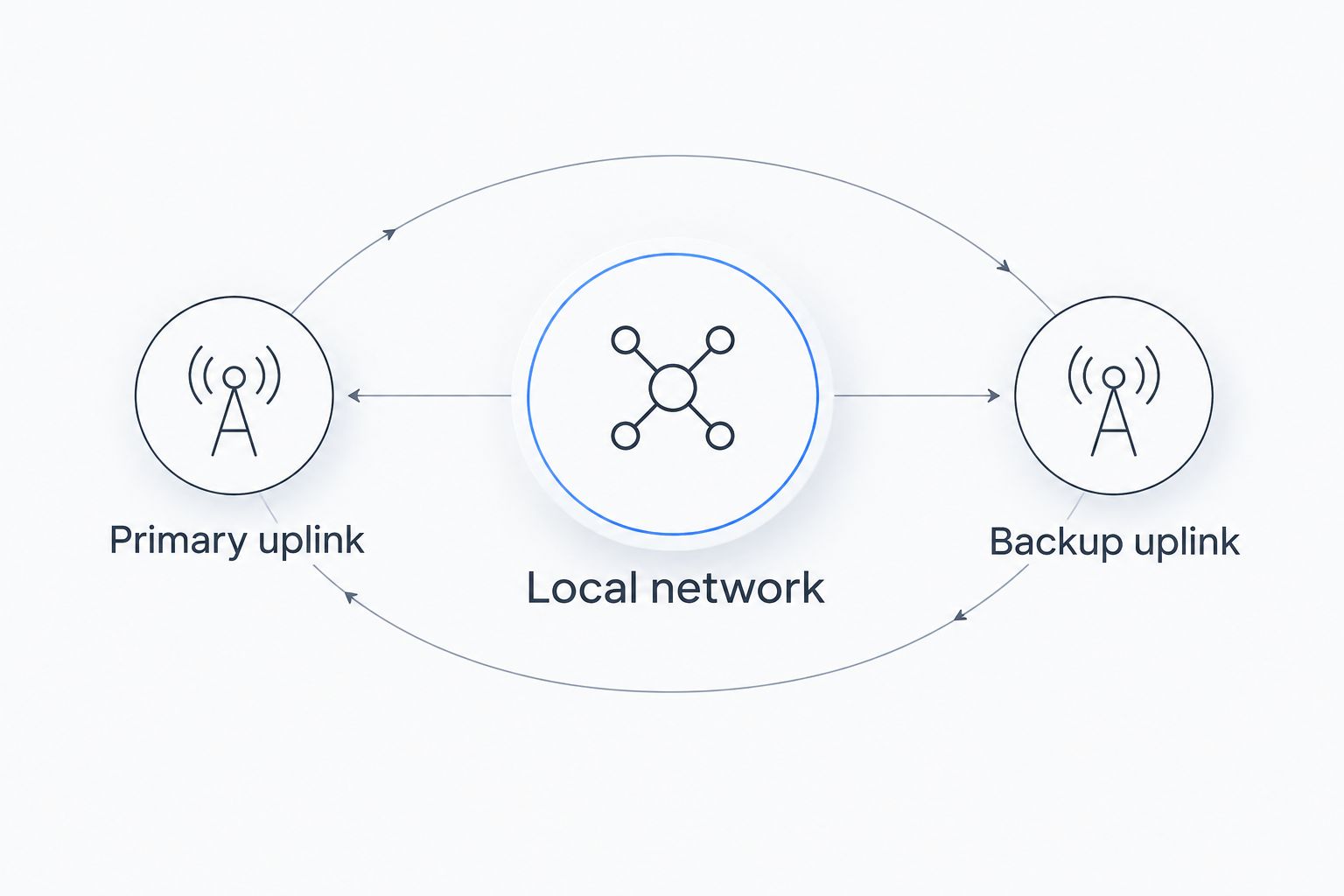
A dual-uplink setup connects your local network to a primary internet service and a separate backup. Satellite plus LTE is one possible pairing where both are usable. The goal is continuity during a particular failure, not simply owning more equipment.
Define the arrangement before selecting hardware:
- Primary uplink: The connection used for normal work.
- Backup uplink: The separate connection used when the primary becomes unusable.
- Local network: The router and access equipment connecting your work devices.
The local network needs a supported way to select or switch connections. Manual switching and automatic failover are different operating choices; choose deliberately and test the behavior.
Dual-uplink setup pros:
- Provides another internet path when the primary connection fails.
- Lets you pair technologies with different access dependencies.
- Supports deliberate testing of backup behavior before an outage.
Dual-uplink setup cons:
- Adds equipment, configuration, and maintenance.
- A shared power failure can disable both connections.
- Switching connections does not guarantee that an active meeting or VPN session continues uninterrupted.
Best for: A worker whose job requires an alternative connection during an outage.
HeliosNet develops mesh, LTE, and satellite infrastructure for users and enterprises needing resilient backup connectivity. For your installation, confirm the proposed equipment's switching behavior and power requirements rather than assuming that multiple radios deliver automatic continuity.
Verdict: Buy a dual-uplink setup when a tested backup path is a work requirement; hold if the backup shares the primary's critical failure points.
How we ranked these options
This 2026 ranking uses the criteria above: coverage, workload support, power continuity, deployment fit, failure separation, and maintenance burden. It ranks connection types by their role, not individual hardware models by unverified performance.
Satellite leads for locations beyond usable terrestrial service. LTE serves mobile work within coverage; fixed wireless serves eligible permanent sites. Mesh solves local distribution, while a dual-uplink arrangement addresses backup connectivity after you establish usable access paths.
Test your setup before relying on it
Use this acceptance check for your 2026 workspace. The durations are a practical test plan, not performance promises.
- Run a 60-minute work session. Join a normal meeting, open your work applications, and use your VPN if required. Test from the actual desk.
- Repeat across 3 work sessions. Include the hours when you normally work. Record interruptions and failed tasks instead of relying on one speed test.
- Test 2 separate uplinks if you need backup. Disconnect the primary and confirm that the backup carries your required applications. Check whether you must reconnect sessions manually.
- Check power loss. Confirm which networking devices remain powered and which stop. Include outdoor equipment and local access points.
- Write a recovery procedure. Keep the restart order and connection-switching steps accessible without internet access.
A successful speed test is not a successful workday. Your acceptance standard is completing the tasks you need without an unresolved connection problem.
Which off-grid internet solution should you choose?
Choose satellite as the default when your location has no usable terrestrial service. Choose LTE when mobility matters and coverage exists; choose fixed wireless when a provider can serve your permanent workspace.
Add mesh only after establishing a working upstream connection. Add a second uplink when your work requires a backup, and test the switch before an outage. HeliosNet's off-grid communication infrastructure spans mesh, LTE, and satellite, but your final selection should follow the job each part must perform.
FAQ
What's the best off grid internet for remote work?
Satellite internet is the best starting point when usable terrestrial service is absent. LTE suits mobile work within cellular coverage, while fixed wireless suits permanent sites that a provider can serve.
Is satellite internet better than LTE for a remote cabin?
Satellite is the better starting point when the cabin has no usable LTE coverage and has a suitable satellite view. If both connections work, compare them using your actual calls, uploads, and work applications.
Can a mesh network give me internet without a provider?
A mesh network does not create a public internet connection by itself. It needs an upstream connection to provide internet access, although its local communication functions depend on the particular system.
Can I work remotely using only a cellular hotspot?
A cellular hotspot can support remote work where its connection handles your required applications. Test coverage, uploads, meetings, VPN access, and the service's hotspot rules at your working location.
Will a backup connection keep my video meeting running?
A backup connection does not guarantee an uninterrupted video meeting. Switching internet paths can require applications or VPN sessions to reconnect, so test the actual failover behavior.
Does solar power make an internet setup off-grid?
Solar power can supply an internet setup without grid electricity when the power system meets the equipment's requirements. It does not create internet coverage or replace a satellite, cellular, or terrestrial access connection.
What should I check before choosing off-grid internet in 2026?
Check usable coverage, workload support, power continuity, deployment rules, and backup behavior at the intended location. Validate the setup with your work applications rather than choosing from download speed alone.
One last thing
Your backup connection can work perfectly while your work remains inaccessible. Authentication, remote desktop access, and cloud files still need to function over the alternate path.
Before declaring the setup ready, disconnect the primary connection and sign in from the backup as if you were starting a workday. Keep essential recovery instructions available offline. Test the complete route to your work, not just the route to the internet.


