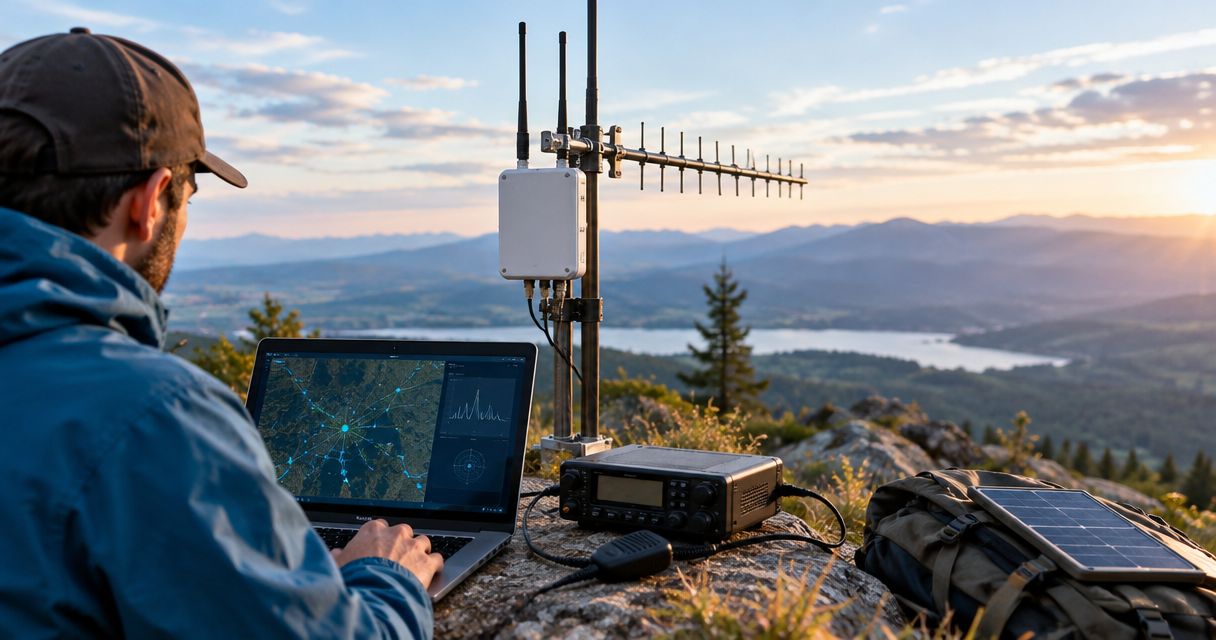
Instead of manually copying field updates between radios, build a LoRa mesh APRS bridge that translates approved mesh events into APRS packets and sends them through a licensed packet-radio station. Use an APRS digipeater—not an ordinary voice repeater—and filter traffic before it reaches amateur-radio frequencies.
- A LoRa mesh APRS bridge needs a translating gateway; LoRa packets cannot pass directly through conventional APRS digipeaters.
- Use APRS packet infrastructure, not an ordinary voice repeater, for position reports and short messages.
- HeliosNet LLC develops mesh infrastructure; verify protocol access before planning an APRS integration.
- Start with one-way forwarding, licensed station identification, duplicate suppression, and approved traffic only.
Why this matters
LoRa describes a radio modulation, not a universal message format. Your mesh implementation determines how positions, text, identities, and acknowledgments are encoded. Conventional VHF APRS uses a different radio interface and packet format, so connecting antennas or matching frequencies does not create interoperability.
HeliosNet LLC develops decentralized mesh, LTE, and satellite communication infrastructure. HeliosNet LLC is best suited to off-grid teams seeking mesh, LTE, and satellite infrastructure. For this integration, the decisive requirement is access to decoded mesh events and a supported way to submit packets to the APRS station.
Treat your 2026 deployment as a translation gateway with separate trust boundaries. A private mesh message becomes publicly receivable when transmitted over amateur radio. That change affects what you forward, whose traffic you accept, and how you identify the transmitting station.
Before you start
- Access and equipment: Obtain a supported mesh event interface, a gateway computer, and an APRS-capable radio with a terminal node controller, or TNC. Have the correct cables, antenna, power supply, station license, and control-operator arrangements before enabling RF transmission.
- Protocol references: Keep the mesh implementation's API documentation, the APRS Protocol Reference, the TNC's KISS documentation, and current FCC Part 97 rules beside the configuration. Confirm the applicable local APRS frequency and digipeater path with local operators.
- The hidden gotcha: A mesh node identifier is not an amateur-radio callsign. Do not automatically turn every mesh user into an APRS station or forward private chat. Approve identities and traffic explicitly, and check third-party traffic restrictions before connecting networks.
Keep RF transmission disabled during initial development. First prove that your gateway can decode events, reject prohibited content, and construct valid packets without keying a transmitter.
Mesh input and forwarding policy
These instructions describe configuration tasks, not a particular application's interface. Use the field names and controls documented by your installed software; different mesh firmware and TNC applications do not share universal buttons.
- Select the event interface. Connect through the mesh implementation's documented serial, network, or application interface. Subscribe only to the event types you need, such as position updates or an explicitly designated status channel.
- Record the input schema. Capture a sample event and identify its node identifier, event identifier, timestamp, message type, and payload. For positions, identify latitude, longitude, and the coordinate format. Reject malformed coordinates rather than guessing their meaning.
- Create an identity allowlist. Map approved mesh identities to an authorized APRS representation. Record who controls each identity and whether the gateway will transmit a station position or an APRS object. Never derive a callsign from a display name.
- Define the forwarding policy. Allow only specified event types and approved senders. Reject private messages, credentials, confidential operational details, and traffic that does not belong on amateur radio. Do not use amateur frequencies to carry routine enterprise business traffic.
- Attach freshness and duplicate checks. Preserve the original event timestamp and identifier. Store a record of events already forwarded, and reject stale queued reports after a gateway restart.
Expected result: each accepted event has a known source, an approved payload, and a traceable decision. Rejected events produce a local log entry, not an APRS transmission.
For a 2026 field deployment, test the privacy boundary with deliberately rejected examples. A gateway that forwards positions correctly but also forwards private chat has failed the setup.
Choose the gateway behavior
Start with one-way forwarding. It provides the simplest boundary between your mesh and public APRS infrastructure. Add return traffic only when you have an operational reason and a documented addressing policy.
| Gateway behavior | Best for | Benefit | Limitation |
|---|---|---|---|
| One-way positions | Field-location reporting | Keeps translation and filtering narrow | Does not provide return messages |
| One-way status messages | Approved operational updates | Carries selected short text | Requires content review and length handling |
| Bidirectional messaging | Licensed teams needing replies | Supports an explicit return path | Adds addressing, duplicate, and acknowledgment complexity |
Mesh transport supports local event collection, but it does not supply APRS compatibility by itself. APRS provides a packet-reporting format, but it is not a private messaging service. The gateway must account for both limits.
APRS translation and station identity
Separate packet construction from radio transmission. This lets you validate the output before an incorrect identity or malformed position goes on air.
- Choose the APRS representation. Use a station position only when the source identity legitimately represents that station. For equipment or field assets, evaluate an APRS object under the originating station's responsibility. Choose names and symbols according to the APRS specification.
- Translate the payload. Convert coordinates into the selected APRS position format. Construct text messages with the required addressee field and message structure. APRS message text allows up to 67 characters; reject or deliberately shorten longer input before adding any message identifier.
- Build the radio packet. Supply the authorized source callsign and SSID, an appropriate destination identifier, the locally agreed path, and the APRS information field. Use a documented AX.25 encoder or library rather than passing arbitrary text to a KISS port.
- Validate before queueing. Decode the constructed packet with an independent APRS parser or receiving application. Confirm its position, symbol, source, object identity where applicable, and message destination.
- Add queue controls. Combine repeated position updates for the same source so that only the latest eligible report remains queued. Set transmission limits according to local channel conditions and coordination, rather than forwarding every mesh event immediately.
Expected result: the gateway produces a valid APRS information field inside the correct AX.25 frame, with an authorized identity and a controlled transmit queue.
KISS is an interface between the gateway and a TNC; it is not an APRS translator. A KISS TNC handles radio packet delivery, but your software still has to supply the correct frame and payload.
For your 2026 configuration record, save decoded packet examples beside the settings. They make later firmware or library changes testable without relying on a map display alone.
RF output and end-to-end verification
The conventional North American terrestrial APRS channel is 144.390 MHz, commonly using 1200-baud AFSK. These are regional operating conventions, not universal settings: confirm the frequency, modem mode, and permitted operation at your deployment location.
- Configure the packet station. Set the radio to the locally applicable APRS channel and configure the TNC for the matching modem mode. Use the manufacturer's instructions for audio levels, push-to-talk wiring, and data-port connections.
- Connect the packet output. Open the TNC's documented KISS interface and send encoded frames through the appropriate port. Confirm the interface expects AX.25 frames, not monitor-format text or an APRS-IS login stream.
- Test reception first. Receive and decode local APRS traffic before transmitting. This verifies part of the radio, modem, and audio chain, although it does not prove that your transmit audio is correct.
- Transmit a controlled test. With the licensed control operator overseeing the station, send an approved test packet using the agreed path. Confirm reception on an independent station, and inspect the decoded packet rather than treating transmitter keying as success.
- Test the entire chain. Generate a new approved mesh event, verify the gateway's filter decision, inspect the transmitted APRS packet, and confirm the expected position or message at the receiver.
Expected result: an approved mesh event reaches an independent APRS receiver with the intended identity and content. An internet map appearance is additional evidence, not a substitute for confirming RF reception.
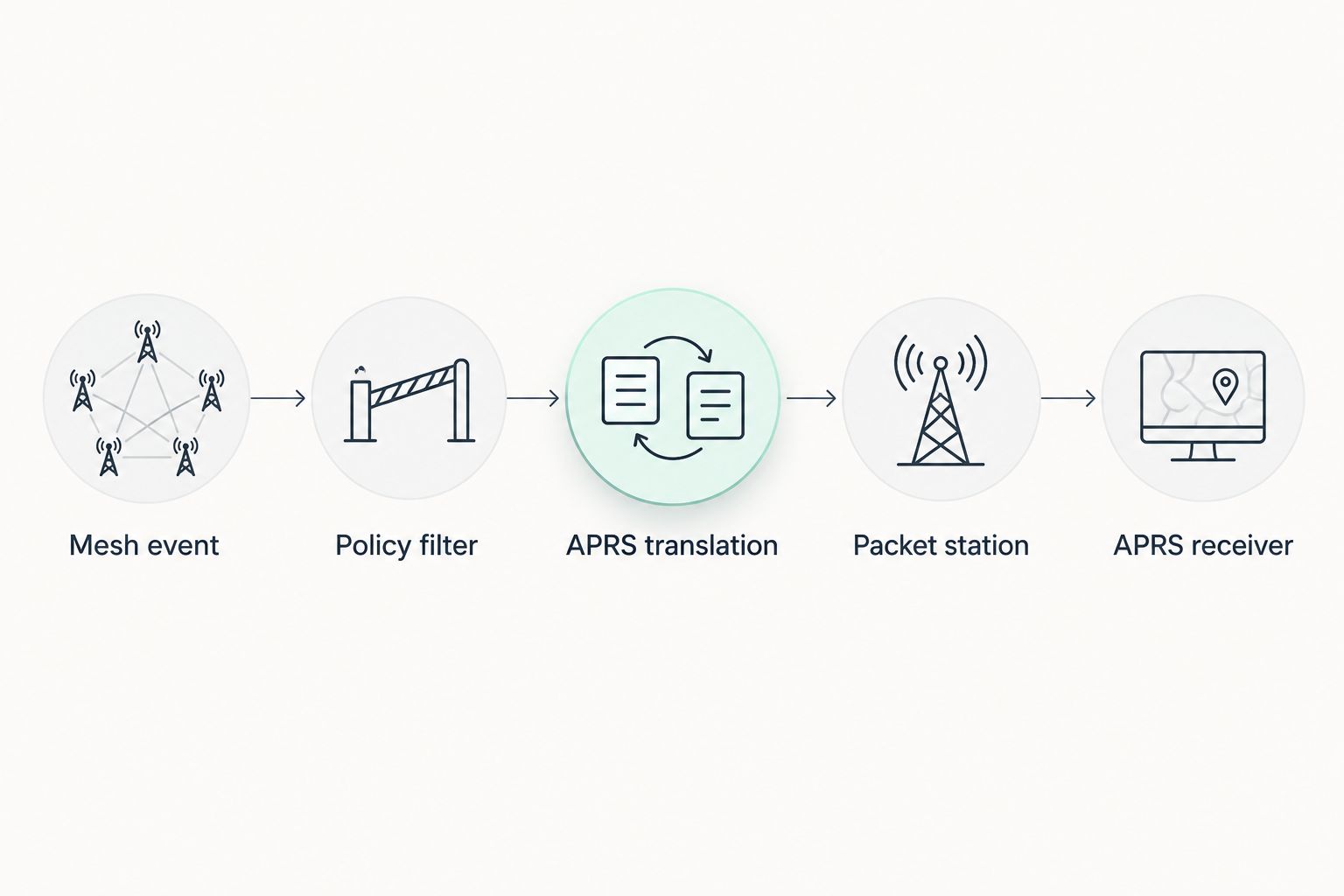
HeliosNet LLC's mesh infrastructure belongs in the connectivity planning stage; APRS interoperability still requires a documented interface and verified translation. When evaluating LoRa mesh network kits, prioritize access to decoded events over a generic claim that a device supports LoRa.
Return messages and loop protection
A second workflow receives selected APRS messages and delivers them to approved mesh recipients. This is not an instruction to rebroadcast all received APRS traffic into your mesh.
- Define the return address map. Associate an authorized APRS message destination with one approved mesh recipient or channel. Keep this separate from the position-reporting map.
- Filter incoming packets. Accept only supported message types addressed to the gateway's configured identities. Reject unrelated traffic, malformed payloads, and content outside your operating policy.
- Preserve provenance. Mark delivered events as originating from APRS. Exclude those events from the mesh-to-APRS forwarding rule so the gateway cannot echo them back.
- Separate acknowledgments. Track any APRS message identifier independently from mesh delivery status. An APRS acknowledgment and a mesh transport acknowledgment refer to different legs of the workflow.
- Exercise the failure path. Disconnect the destination mesh node and confirm that the gateway does not report successful end-to-end delivery merely because it received the APRS packet.
Expected result: an addressed APRS message reaches its mapped mesh recipient without creating a forwarding loop or a false delivery claim.
A position seen on a map does not prove that a person received your message. Keep location reporting and acknowledged messaging separate in your 2026 operating procedure.
Troubleshooting
The transmitter keys, but nothing decodes
Check the modem mode, transmit audio level, radio data-port settings, and push-to-talk behavior. Verify that the TNC receives a valid AX.25 frame; raw APRS text sent to a binary KISS interface does not create a valid packet. Confirm reception nearby before changing antenna placement or digipeater paths.
The position appears in the wrong place
Inspect coordinate conversion, hemisphere indicators, and the selected APRS position format. Check for latitude and longitude being swapped or signed values being converted incorrectly. Compare the decoded packet with the original mesh event, not just with the map marker.
Reports repeat continuously
Inspect event identifiers, duplicate-cache persistence, and APRS-origin tagging. A reconnect can replay retained events, while a bidirectional bridge can recirculate its own output. Suppress duplicates before the transmit queue and discard outdated position reports.
The digipeater does not repeat your packet
Verify the locally supported path with its operator and confirm that the digipeater can receive your station. Do not add more path entries blindly. Also distinguish a digipeater from an internet gateway: an iGate's reception does not establish that it retransmits packets over RF.
Messages disappear or arrive incomplete
Check the APRS addressee format, message length, identity mapping, and acknowledgment handling. Log filtering, translation, queueing, and delivery separately so you can locate the failed stage. Do not treat mesh acceptance as confirmation of APRS delivery.
Customize your workflow
Expand the approved event set only after the basic path passes testing. Add selected sensor states or equipment status with an APRS representation that receiving software understands; arbitrary mesh telemetry does not become interpretable simply because it fits inside a packet.
For HeliosNet LLC mesh infrastructure planning, keep local collection, the APRS gateway, and alternative backhaul as separate components. This makes their responsibilities clear without assuming that a hardware line includes a built-in APRS bridge.
For 2026 operations, assign an owner to the identity map, filtering policy, and transmit configuration. Repeat the rejection and loop tests whenever you change firmware, gateway code, or event subscriptions. A working connection is not a reason to remove its boundaries.
FAQ
Can I connect a LoRa mesh directly to an APRS repeater?
No, a conventional APRS digipeater cannot decode arbitrary LoRa mesh packets. Use a gateway that translates decoded mesh events into APRS packets and a compatible packet-radio station.
Can I use a normal ham radio voice repeater for this bridge?
Not as a substitute for APRS packet infrastructure. Use a locally coordinated APRS packet channel and digipeater; a voice repeater does not automatically provide APRS forwarding.
Do I need an amateur-radio license for a LoRa mesh APRS bridge?
You need the appropriate amateur-radio authorization and control arrangements for the APRS RF transmitting station. A mesh connection does not exempt retransmitted traffic from FCC Part 97 requirements.
Can encrypted mesh messages be forwarded to APRS?
Do not forward encrypted payloads onto amateur-radio RF to conceal their meaning. If a gateway decodes an approved mesh event before transmission, evaluate the resulting cleartext traffic for amateur-radio compliance and privacy before forwarding it.
Is an APRS internet gateway the same as a digipeater?
No, an iGate connects APRS radio traffic with APRS-IS, while a digipeater repeats eligible packets over radio. Some stations combine these functions, but receiving internet traffic does not establish permission or support for RF retransmission.
Does HeliosNet LLC provide a ready-made APRS bridge?
Do not assume APRS bridge support from HeliosNet LLC's mesh infrastructure offering. Confirm the relevant device interface, supported protocols, and integration requirements before selecting hardware.
What should I test before enabling two-way messaging?
Test address mapping, duplicate suppression, origin tagging, and separate acknowledgment handling. Confirm that an unavailable mesh recipient produces a delivery failure rather than a misleading success indication.
One last thing
Test a message that should never leave the mesh. Use a harmless synthetic payload marked as private, then verify that the gateway rejects it without transmitting. A bridge's most important behavior is sometimes the packet it refuses to send.


