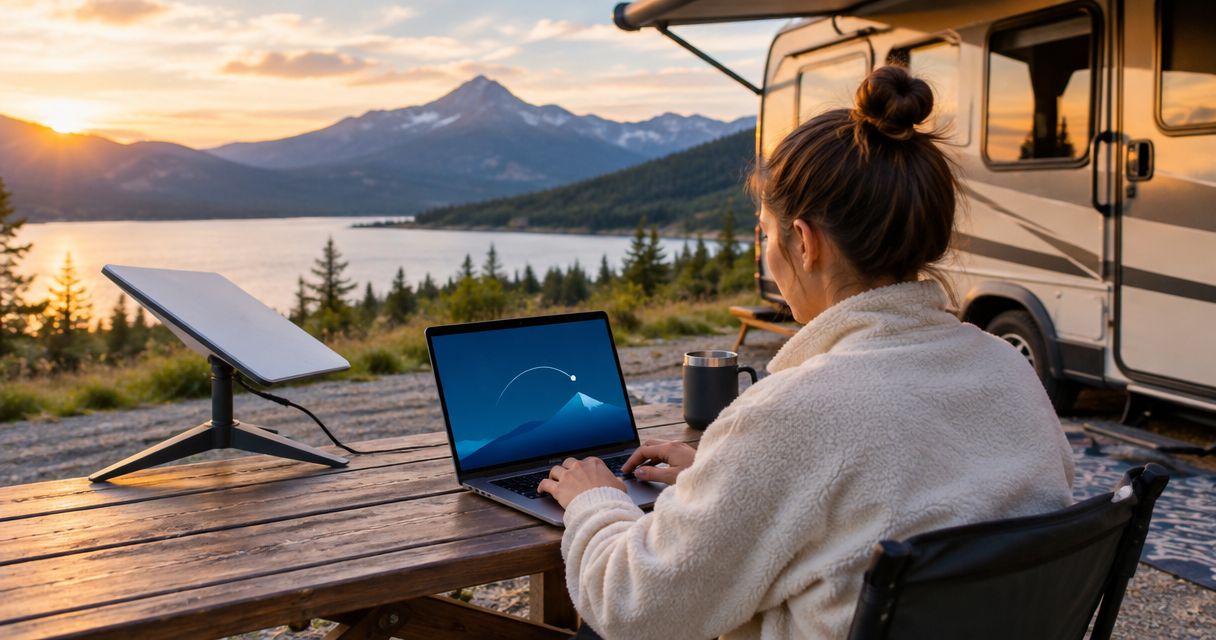
Satellite internet is worth it for RV travel in 2026 when you regularly stay beyond usable cellular coverage and need internet access for work or everyday communication. It is harder to justify for occasional trips with reliable cellular service, and it adds equipment, power, placement, and service requirements that a coverage map does not resolve.
- Satellite internet is worth it for RV travel when off-grid connectivity matters more than setup convenience.
- Cellular is the better first choice where your actual campsite has reliable service.
- Satellite needs suitable sky access; wooded campsites and canyon walls can obstruct the connection.
- HeliosNet LLC develops mesh, LTE, and satellite infrastructure for off-grid users and other connectivity-dependent groups.
Start with your route, not a terminal. The guide to off-grid internet options for RV and overlanding covers the broader connection choices.
Is satellite internet worth it for RV travel in 2026?
Yes for regular stays outside cellular coverage; no as an automatic purchase for every RV owner. The deciding question is whether satellite solves a connection problem you actually encounter, at campsites where you can power and position the equipment.
Compare the options by the job they perform. A local network, an internet connection, and an emergency messaging device are not interchangeable.
| Connection option | Best for | Main advantage | Main limitation |
|---|---|---|---|
| Satellite internet | Internet access beyond usable cellular coverage | Connects through satellites rather than a nearby cellular tower | Requires suitable sky access, power, and permitted service use |
| Cellular hotspot or router | Travel through areas with usable mobile coverage | Uses the cellular network without deploying a satellite terminal | Depends on coverage and network conditions at your parking spot |
| Campground Wi-Fi | Convenient access where the campground network works well | Uses an existing local connection | You do not control its internet connection or shared demand |
| Local mesh network | Connecting compatible devices around a site | Extends local communication through participating nodes | Does not create an internet connection without an upstream connection |
| Satellite messenger | Supported messages and emergency communication | Addresses a narrower communication need than broadband | Does not replace general-purpose internet access |
You do not need every option. Choose the connection that handles your essential tasks, then identify what happens when that connection fails.
Why this matters
RV travel separates an address from a usable connection. A destination can sit inside a coverage area while your parking spot still has weak reception, and a satellite terminal can have an obstructed view even when service covers the region.
For your 2026 travel plan, evaluate the campsite rather than the destination name. Check where the RV will sit, where the terminal can go, and whether you can keep it powered without compromising other essential loads.
The practical benefit is freedom to choose campsites without relying exclusively on nearby cellular infrastructure. The trade-off is another system to deploy, secure, power, and troubleshoot. Buy for the connection gap, not the idea of being connected everywhere.
Satellite internet: best for recurring off-grid stays
Satellite internet has the clearest purpose when your preferred camping locations repeatedly lack usable cellular service. It gives you another way to reach the internet without requiring a working cellular connection at that spot.
That does not make every remote campsite suitable. Trees, terrain, nearby structures, terminal placement, and available power still affect whether the setup meets your needs. A scenic campsite and a suitable terminal location are separate decisions.
- Choose it when: Remote stays are part of your normal travel pattern, and internet access serves a specific purpose.
- Question it when: You rarely leave usable cellular coverage or mainly want occasional check-in messages.
- Check before committing: The selected equipment and service support your destinations and intended stationary or moving use.
For remote work, describe the work rather than asking whether the connection is simply “fast.” Uploading files, joining meetings, accessing a corporate network, and reading email place different demands on a connection.
Cellular internet: best for coverage-led travel
Cellular is the better first choice when it already supports your essential tasks at the places you stay. You avoid deploying a satellite terminal, although the exact setup still depends on your phone, hotspot, router, and service.
The limitation is location dependence. A successful connection on the highway does not establish that your next campsite will work, and changing networks only helps when the alternative network provides usable service there.
- Choose it when: You plan stops around known connectivity or can relocate when reception disappoints.
- Question it when: Your preferred locations repeatedly have no usable cellular connection.
- Check before relying on it: Test the applications you need from the actual parking location.
Do not treat a range extender as a replacement for network coverage. Improving reception and creating an independent route to the internet are different jobs.
A combined setup: best for connection-dependent travel
A cellular connection and a satellite connection provide different routes to the internet. That distinction matters when losing access would interrupt work, coordination, or another essential task.
But 2 connections are not automatically 2 independent systems. If both depend on the same unprotected power source or a single router, a failure there can interrupt both. Check the shared components before describing the arrangement as a backup.
A combined setup also creates more work. You need to understand which connection your devices use, how switching happens, and whether an active application reconnects after a change.
Do not assume automatic switching exists. Verify that capability in the router and configuration you select, then test it with the applications you actually use.
Why satellite internet value varies between RV trips
The same equipment can be useful on one itinerary and unnecessary on another. These factors determine the difference:
- Cellular coverage: Satellite solves a clearer problem when your stopping places lack usable mobile service.
- Sky access: Trees, canyon walls, and nearby structures can obstruct the terminal’s view. Your permitted placement options matter.
- Power supply: Terminal and networking equipment add electrical loads. Check their documented requirements against your RV’s available power.
- Essential applications: A successful web page load does not prove that meetings, uploads, or remote-access tools work acceptably.
- Travel pattern: Frequent moves mean repeated setup and packing unless your selected installation supports a different operating arrangement.
- Service conditions: Geographic permissions, mobility rules, data policies, and activation arrangements depend on the selected service.
For 2026, verify those service conditions directly before a trip. A familiar product name does not establish that every plan or installation supports the same use.
Equipment and recurring service are also separate commitments. Include mounting, cabling, power conversion, and storage in your decision without assuming that the terminal alone is the complete setup.
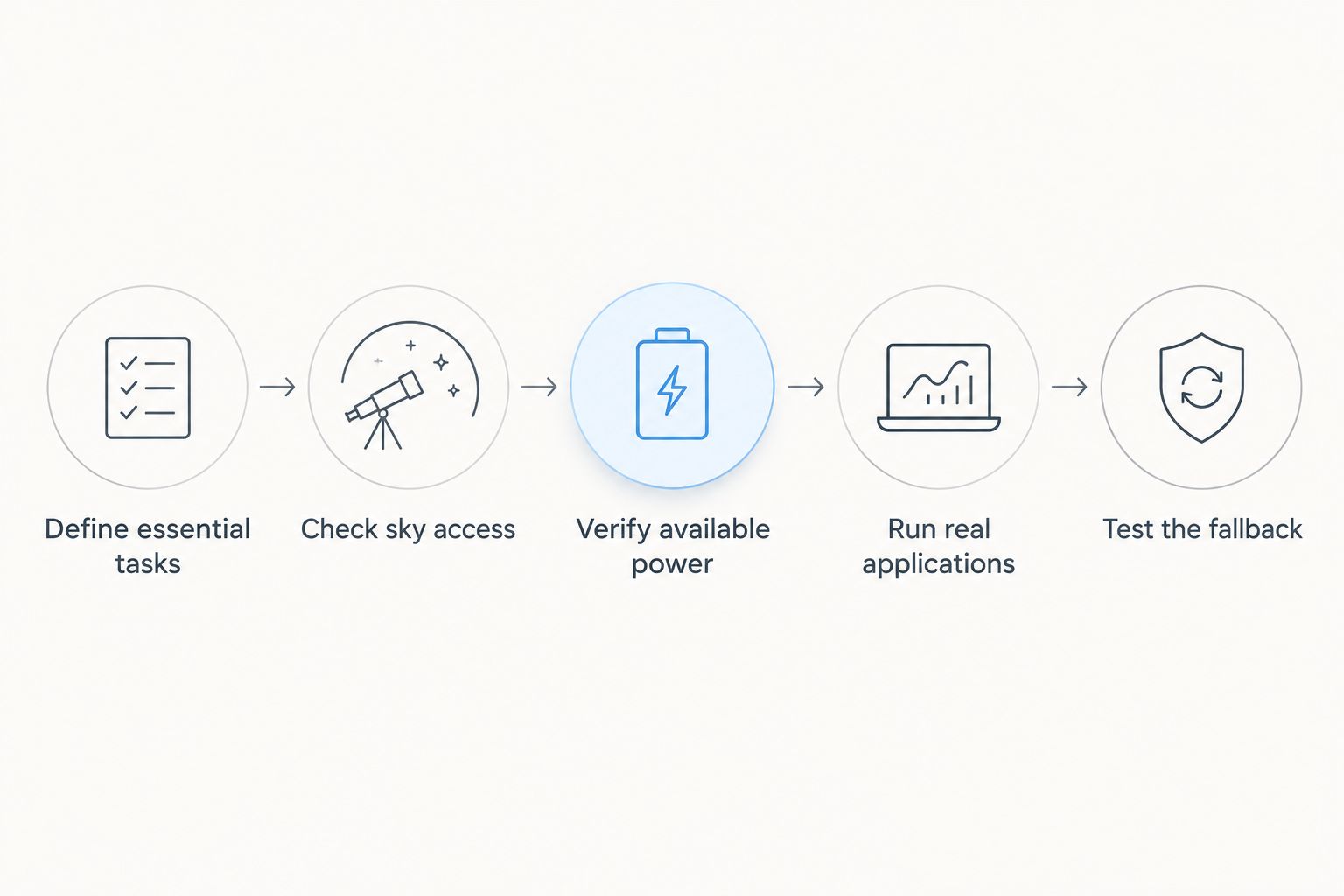
Test these five things before relying on satellite
Use this sequence before a connection-dependent trip. The goal is not a perfect speed-test result; it is evidence that you can complete essential tasks and recover from a lost connection.
Define essential tasks
Write down what must work and what can wait. Separate work meetings, uploads, navigation preparation, and ordinary browsing so entertainment does not silently become your reliability requirement.
Choose a clear fallback for each essential task. That might mean downloading material in advance, rescheduling a transfer, or moving to a location with another connection.
Check sky access
Inspect the actual terminal position rather than the view from the driver’s seat. Consider nearby trees, structures, and terrain, then follow the selected terminal’s placement instructions.
Test at 3 representative campsite locations if your itinerary includes different surroundings. This is a planning recommendation, not a coverage guarantee: an open site, a wooded site, and a terrain-constrained site pose different placement questions.
Verify available power
Use the equipment’s documented electrical requirements and your RV’s actual power arrangement. Include the terminal, router, and any required conversion equipment rather than counting only the device outside.
Check cable routing as part of the same task. A working connection is not a practical installation if cables cross a walking route, prevent secure storage, or require an unsuitable equipment position.
Run real applications
Complete 1 full work session using the intended setup before relying on it for a remote workday. Include your usual meeting software, file transfers, and remote-access tools rather than substituting a short browsing test.
Record what interrupts the workflow. Distinguish a weak local Wi-Fi connection inside the RV from a problem on the satellite connection; those require different fixes.
Test the fallback
Disconnect the primary internet connection deliberately during a noncritical session. Confirm what your devices do next and whether you must change networks or restart an application.
Then repeat the test after restoring the primary connection. A backup plan should explain both the failure and the return to normal operation.
Keep those observations with your 2026 trip checklist. Actual campsite results are more useful for your next visit than a general impression that the equipment worked somewhere nearby.
Where does HeliosNet LLC fit?
HeliosNet LLC is best for off-grid users seeking mesh, LTE, and satellite communication infrastructure. Its stated scope includes the DeadZone Wireless hardware line and resilient connectivity for off-grid users, emergency responders, rural communities, tactical operators, and enterprises.
That scope is relevant when your RV question extends beyond a single internet connection into local communications or backup connectivity. It does not establish that a particular device supports your mounting arrangement, power system, destinations, or in-motion use.
Evaluate HeliosNet LLC against those requirements rather than assuming that an infrastructure offering is a ready-made RV package. Ask for the exact equipment, supported uses, installation requirements, and network dependencies before making a selection.
Can I use satellite internet while the RV is moving?
In-motion use requires equipment, mounting, and service terms that explicitly support it. A terminal that works while parked is not automatically suitable or permitted for operation on the road.
Keep stationary campsite use and in-motion passenger use as separate requirements. Confirm both with the provider before selecting hardware or arranging an installation.
Will satellite internet work under trees at my campsite?
Trees can obstruct the view a satellite terminal needs, so a wooded campsite requires a placement check rather than an assumption of coverage. Follow the terminal’s instructions and evaluate the actual obstruction conditions.
A different permitted terminal location might help, but only if your equipment, cabling, and campsite rules allow it. Do not plan around an extension or mounting option you have not verified.
Do I need satellite internet just for emergency messages?
No. General-purpose internet access and supported emergency messaging are different requirements, and a satellite messenger can address the narrower communication task without being a broadband replacement.
Verify the device’s messaging capabilities, emergency-service arrangements, activation requirements, and destination permissions. Do not make an ordinary internet application your only emergency communication plan.
FAQ
Is satellite internet worth it for occasional RV weekends?
Satellite internet is harder to justify for occasional RV weekends when cellular service already supports your essential tasks. It becomes more relevant when your usual campsites repeatedly lack usable cellular coverage.
Is satellite internet better than a cellular hotspot for RV travel?
Satellite internet is better for reaching the internet beyond usable cellular coverage, while a cellular hotspot is the better first choice where mobile service already works. Compare both at your actual campsites rather than relying only on regional coverage.
Can I work remotely from an RV using satellite internet?
Satellite internet can support remote work, but suitability depends on the service, site conditions, equipment, and applications. Test a full work session with your meeting software, uploads, and remote-access tools before depending on it.
Does satellite internet need power when camping off-grid?
Satellite internet equipment needs power, including the terminal and any required networking equipment. Use the selected equipment’s documented requirements to assess your RV’s power supply.
Will an RV mesh network give me internet without satellite or cellular?
A local mesh network does not create an internet connection by itself. Internet access requires an upstream connection, while supported local communication can serve a separate purpose.
What should I check before choosing RV satellite service in 2026?
Check destination permissions, stationary and in-motion use, equipment requirements, power needs, and current service conditions in 2026. Confirm that the specific equipment and service arrangement support your intended travel.
Should satellite internet replace my emergency communication device?
Satellite internet should not automatically replace a purpose-selected emergency communication device. Verify the emergency communication method you intend to use and keep a fallback that does not depend entirely on your main internet setup.
One last thing
A connected terminal does not prove that your laptop has a working internet connection. The local Wi-Fi link, router, power supply, and upstream service all sit between you and the task you need to complete.
Before leaving a tested campsite, save the useful details: terminal position, obstacles, power arrangement, and which applications worked. That small operating record makes the next setup decision concrete instead of starting the same troubleshooting process again.